Hypertune SEO: week 1 deliverables
Som · week of Monday 5 October 2026 · ordered by task date · updated Sunday 4 October 2026
Needed from you this week
| Who | What | By | |
|---|---|---|---|
| Vin | Book the handover meeting with Austin | Mon 5 Oct | Details |
| Vin | Approve the keyword defaults in the AI content framework (section 8) | Tue 6 Oct | Details |
| Vin | Book Bobby's walkthrough call (the content calendar waits for it) | Tue 6 Oct | Details |
| Vin | Add Bobby to Bing Webmaster Tools, or ask Bobby to import the site from Search Console himself | Tue 6 Oct | Details |
| Vin | Confirm whether compready.gg is verified in Search Console, and who has access | Wed 7 Oct | Details |
| Austin | Answer the 9 decisions in the handover pack so Kamil can ship by Mon 12 Oct | Wed 7 Oct | Details |
| Austin | Say who clicked "Validate fix" in Search Console on 4 Oct | Wed 7 Oct | Details |
| Bobby | Keyword decisions: homepage lead term, /technology keyword, game page order | Wed 7 Oct | Details |
| Bobby | Check the official profiles list for sameAs | Tue 6 Oct | Details |
All deliverables
| Task date | Task | Deliverable | Status | For |
|---|---|---|---|---|
| Mon 5 Oct | V2 | Bing and Ahrefs Webmaster Tools setup | Done, Bobby not added | Bobby, Vin |
| Mon 5 Oct | V7 | Search Console baseline and index check | Done | Vin, Austin, Bobby |
| Mon 5 Oct | V12 | Keyword and competitor research (with keyword map for Bobby) | Done, not sent | Bobby |
| Mon 5 Oct | V6 | Speed fix list | Done | Austin (via Vin) |
| Mon 5 Oct | V6 · V7 | Handover pack for Vin's meeting with Austin | Done | Vin, Austin |
| Tue 6 to Wed 7 Oct | C1 | Titles, descriptions, H1s and copy | Draft | Bobby, Austin |
| Tue 6 to Fri 9 Oct | V8 | AI content framework | Draft | Vin, Hoa, Austin |
| Tue 6 to Thu 8 Oct | V7 | Indexing fix specs | Done | Austin (via Vin) |
| Tue 6 Oct | V13 | Official profiles list for sameAs | Draft, not sent | Bobby |
| Wed 7 to Fri 9 Oct | N1 | Content calendar | Not started | Bobby |
| Thu 8 to Fri 9 Oct | C2 | Trust page draft | Draft | Bobby, Hoa, Vin, Austin |
| Fri 9 Oct | V13 | Fact sheet and directory listing copy | Draft | Bobby, Vin, Hoa, Austin |
| Fri 9 Oct | V5 | Help centre facts to correct | Draft | Hypertune owner named by Austin |
Bing and Ahrefs Webmaster Tools setup
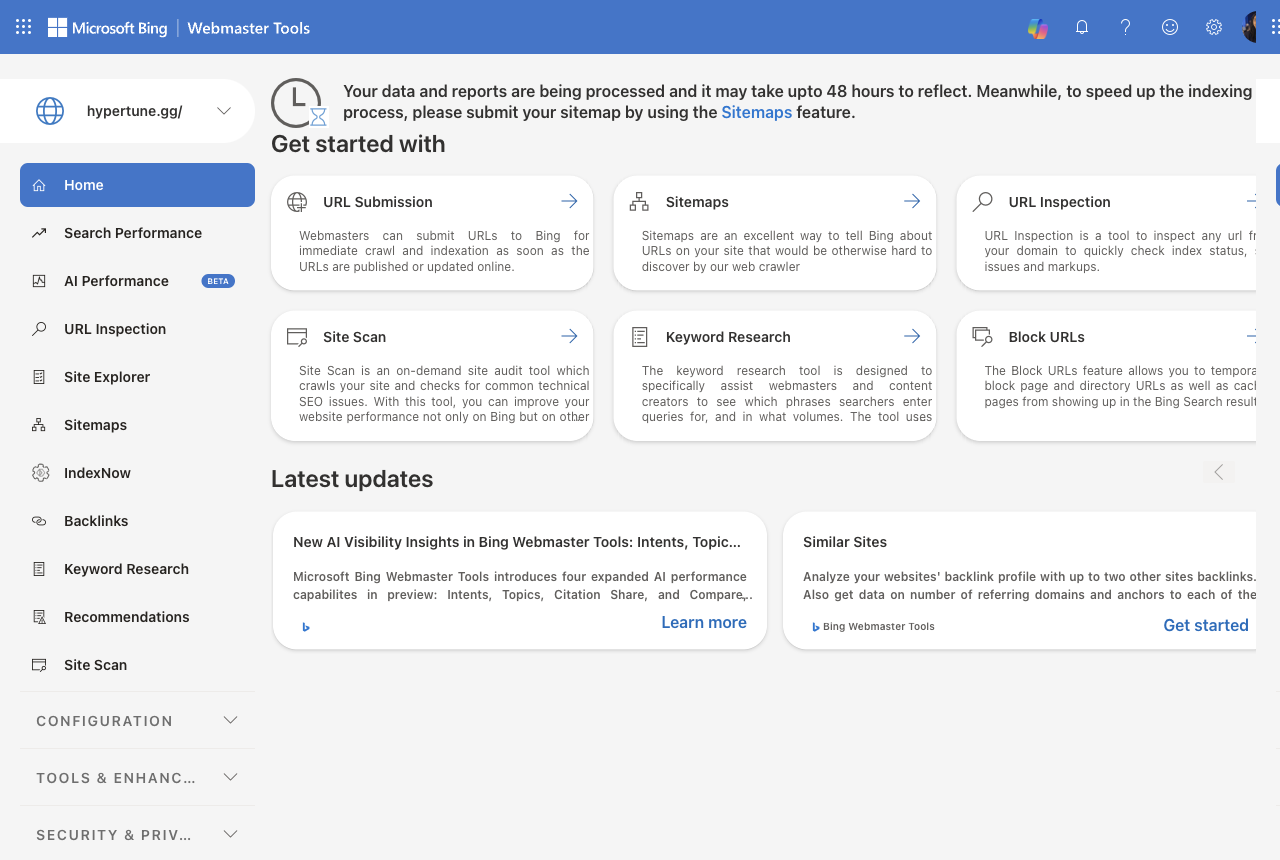
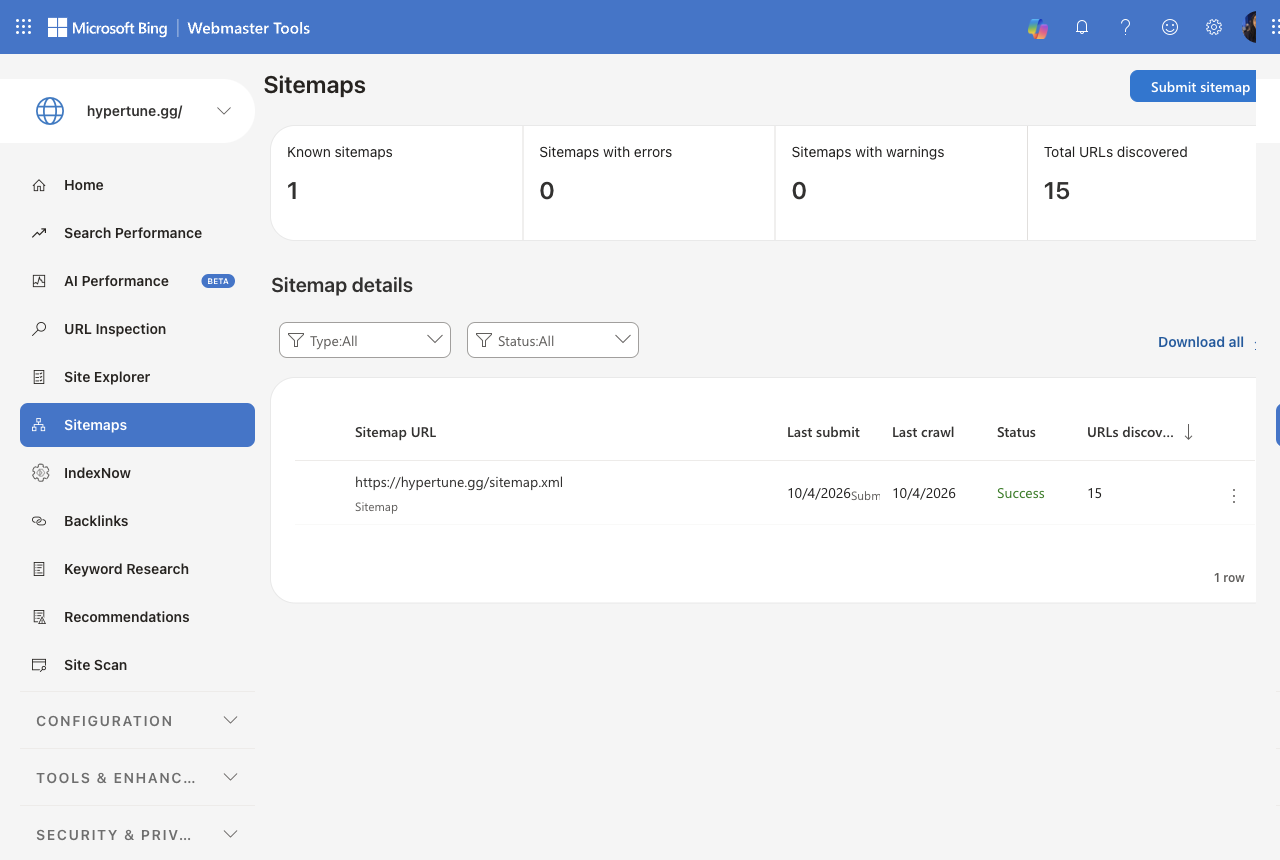
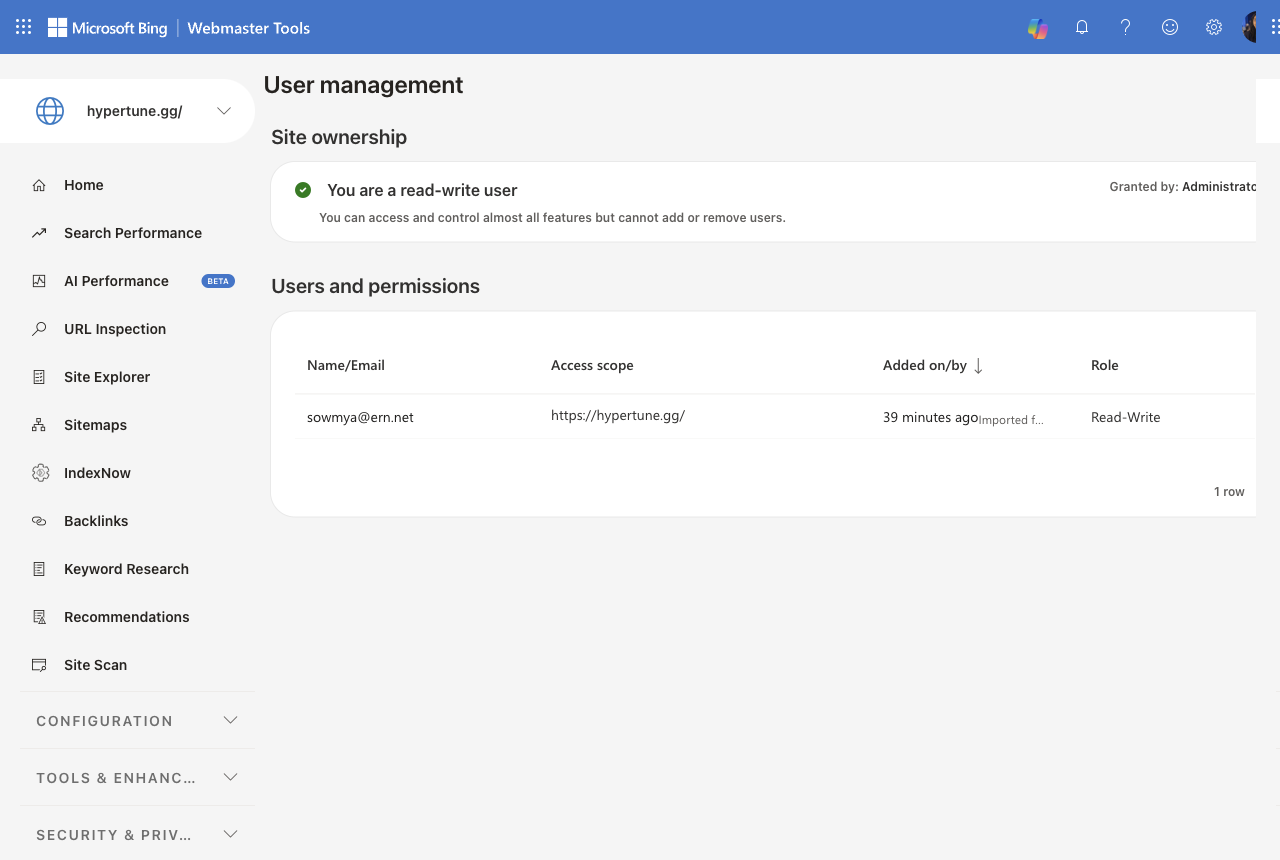
Done, Bobby not addedBing imported from Search Console on 4 Oct; sitemap read with 15 URLs. Ahrefs Webmaster Tools already verified in Vin's Ahrefs project. Open: Som is a Read/Write user in Bing and cannot add Bobby. Bobby can import the site himself through Search Console, or Vin can add him.
Search Console baseline and index check
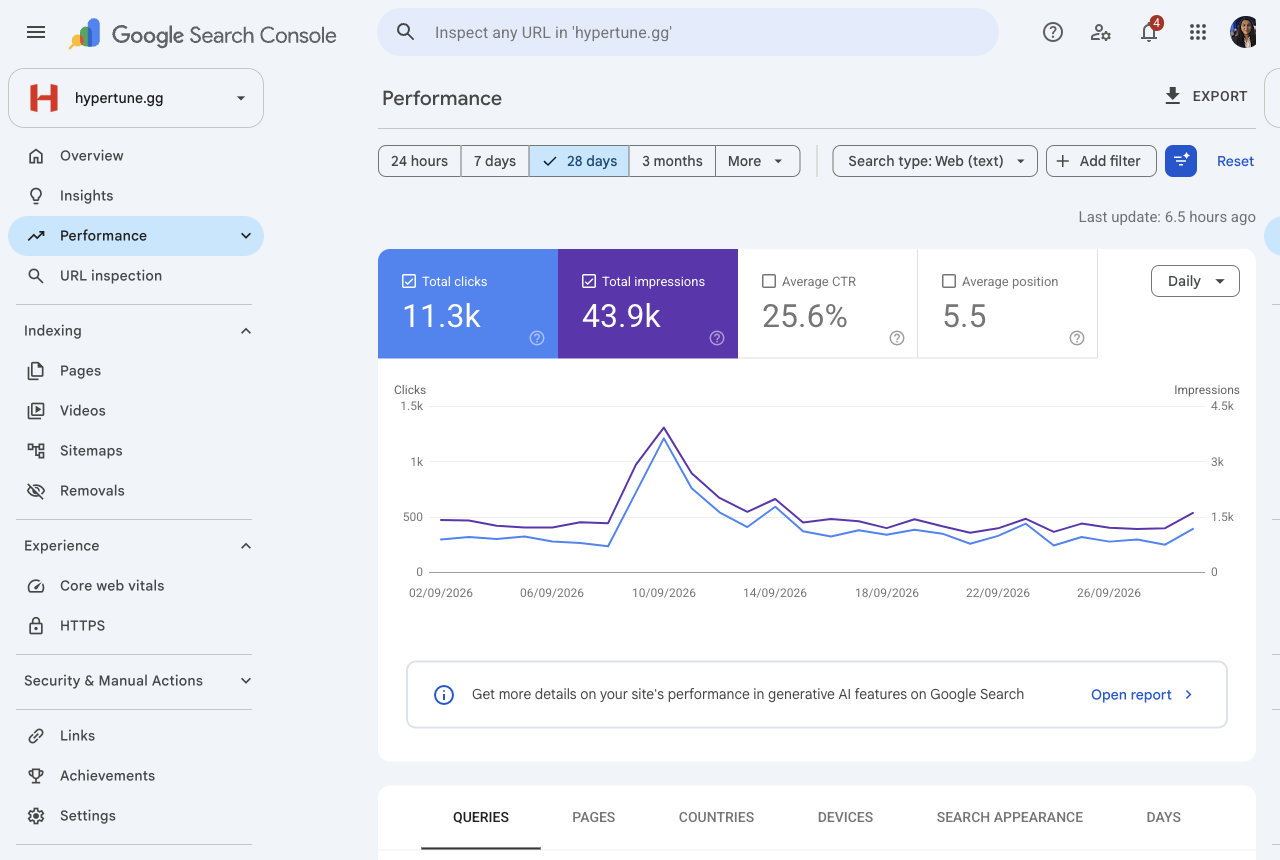
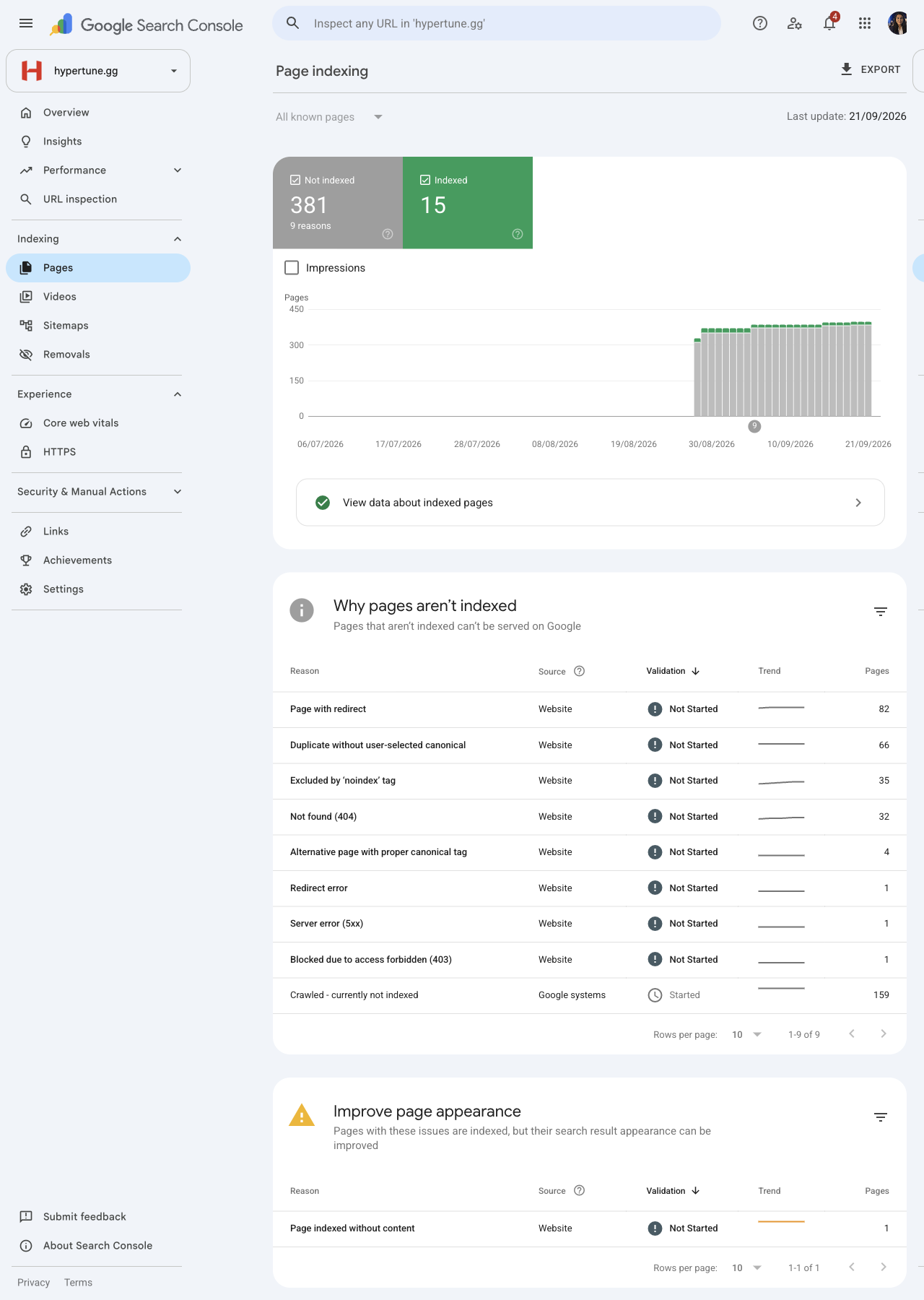
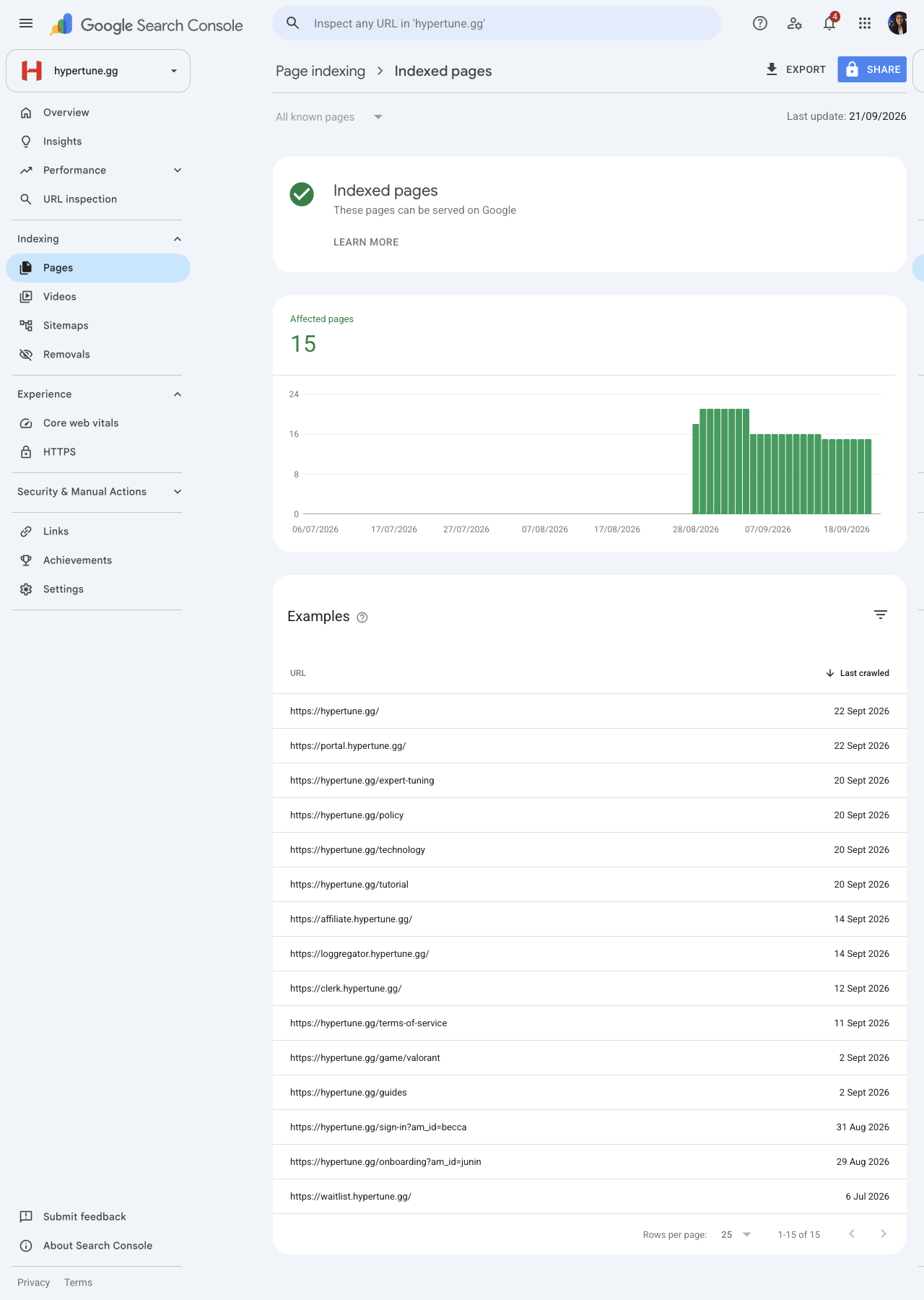
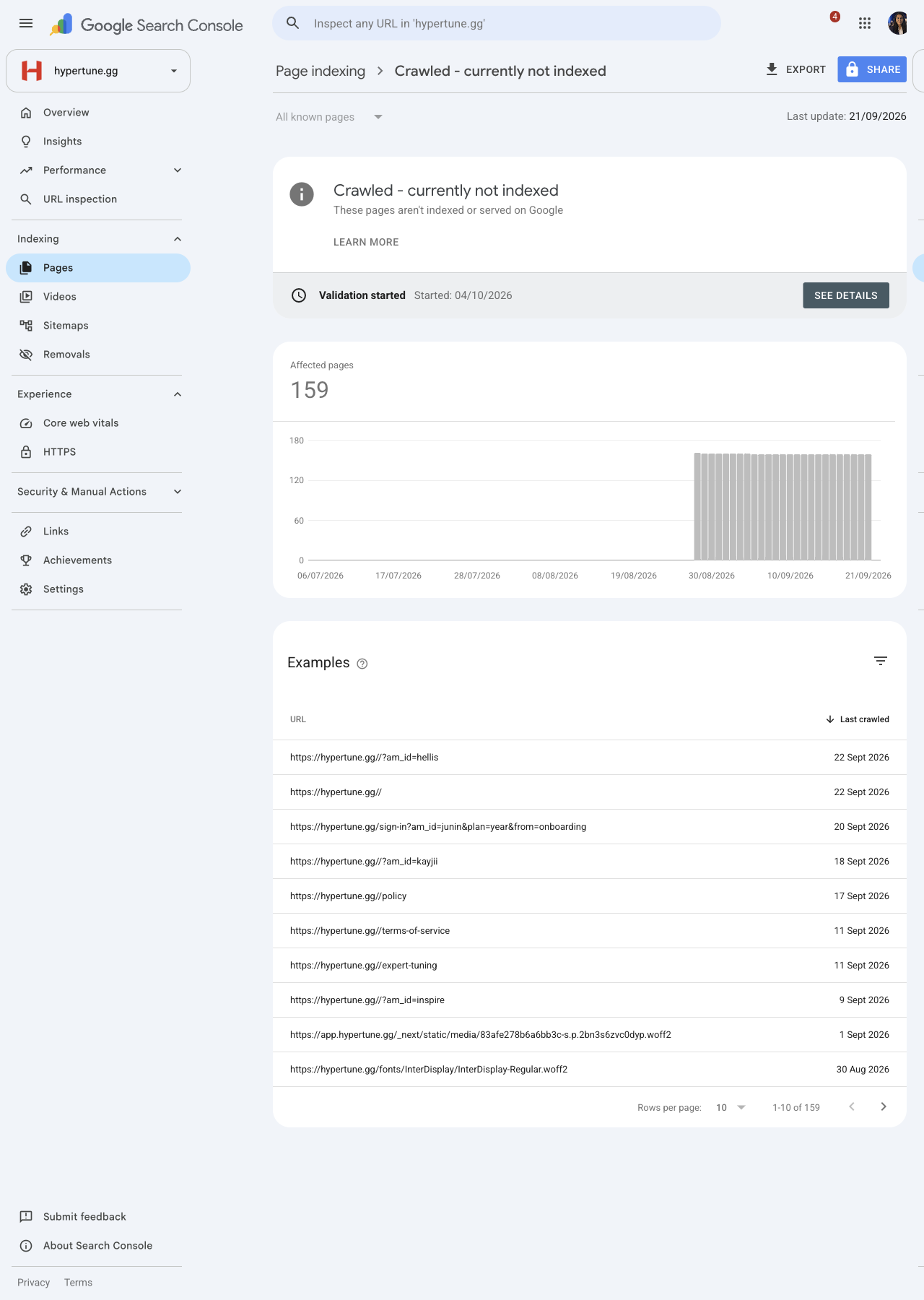
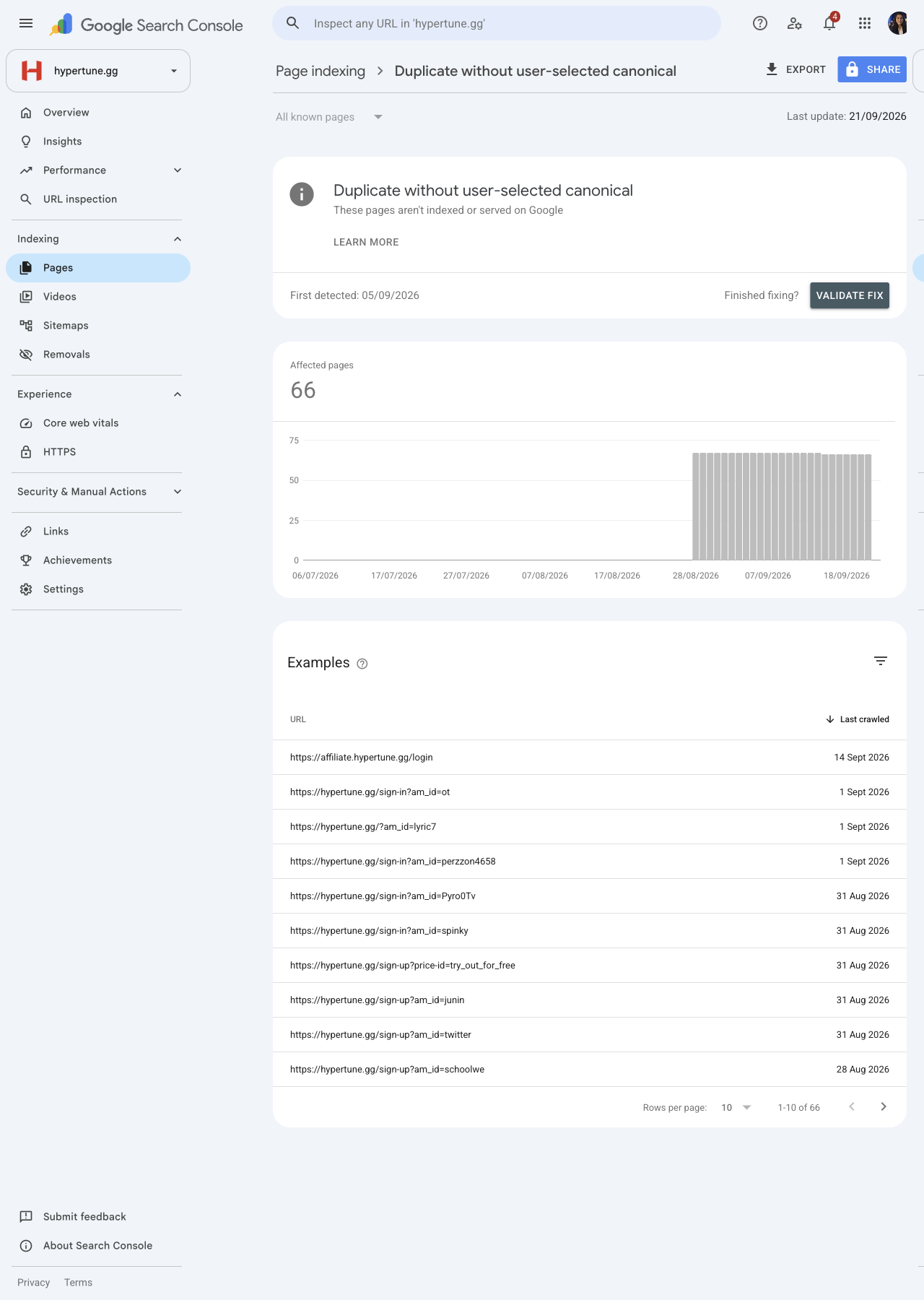
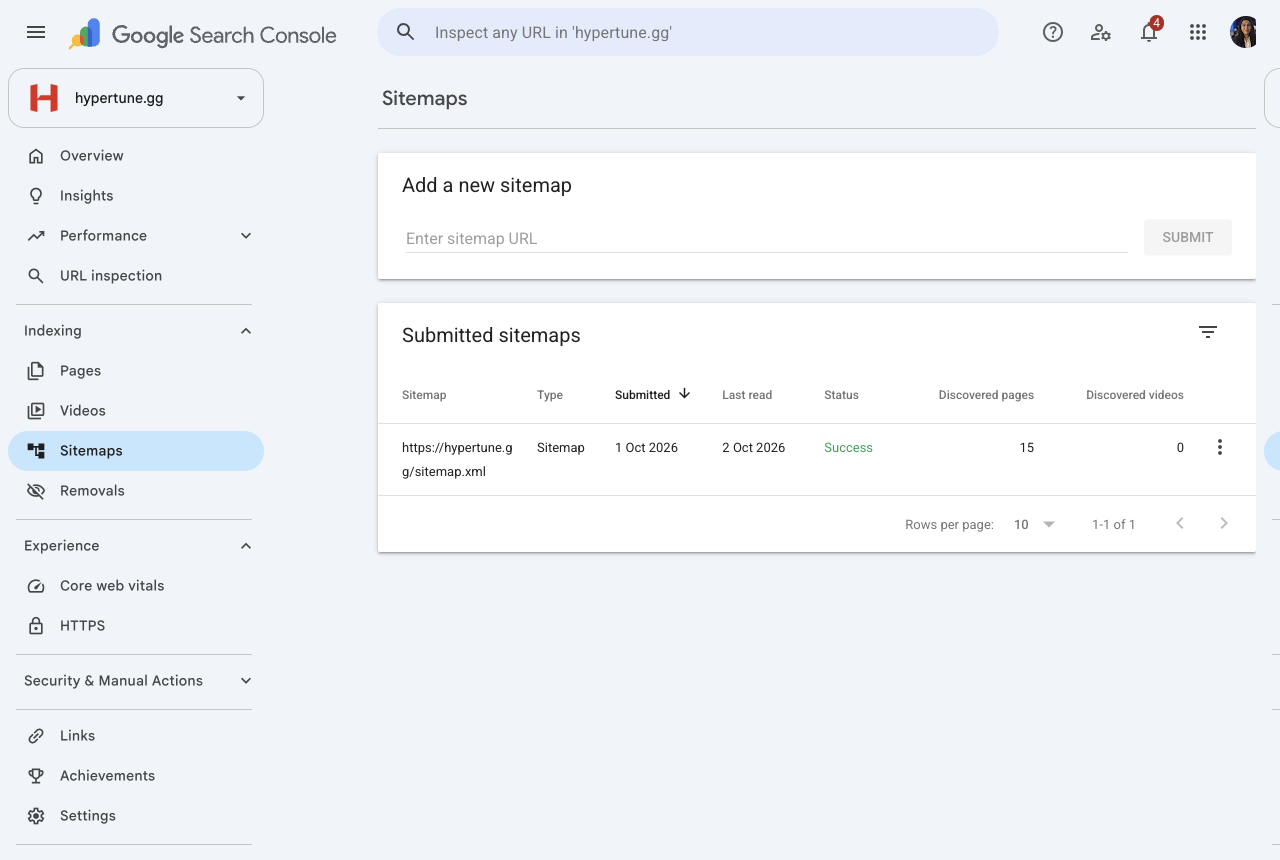
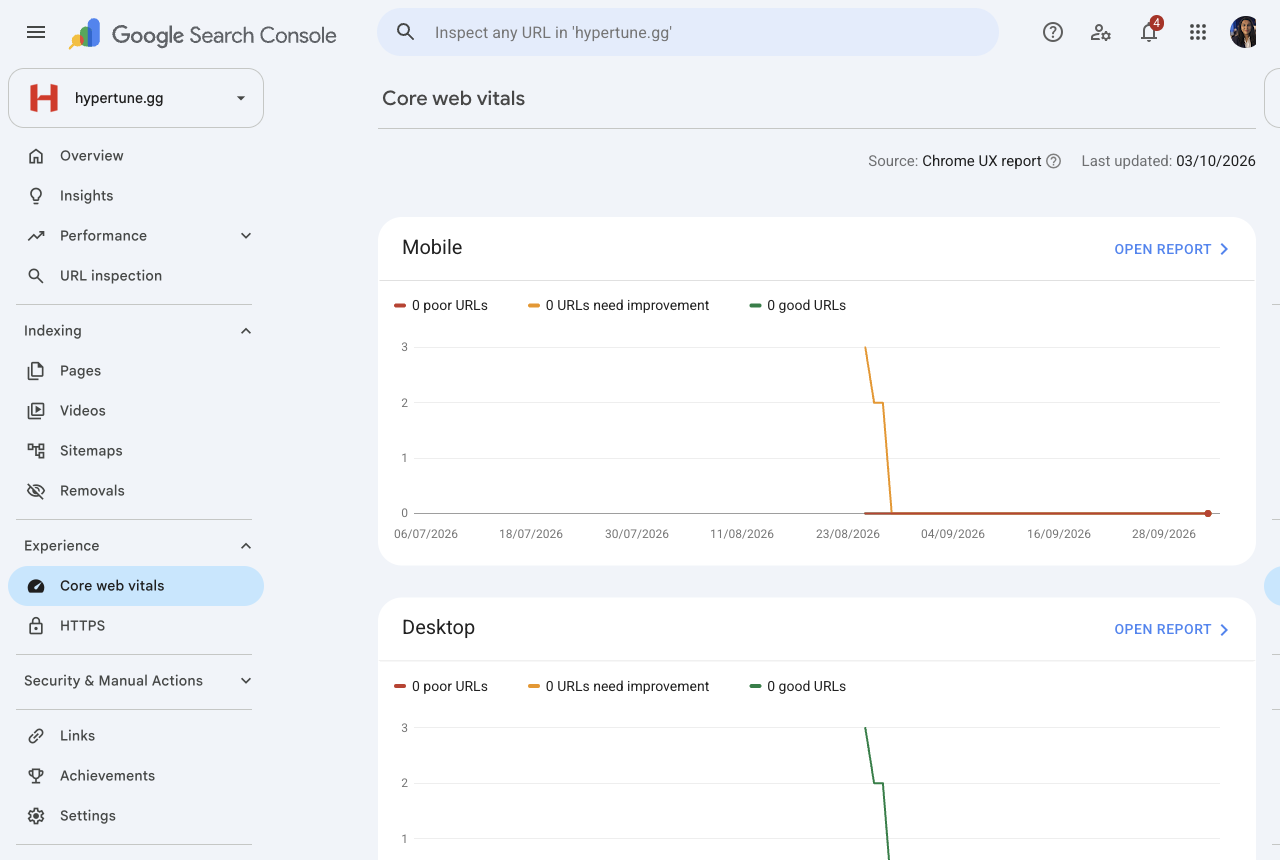
DoneDay-0 baseline (28 days to 3 Oct): 11.3k clicks, 43.9k impressions, 25.6% CTR, average position 5.5. 15 pages indexed, of which only 8 are real site pages; the 5 BIOS guides, /cookies, /uninstall and /what-hypertune-changes are not indexed. Google's index report is dated 21 Sept, before the sitemap was submitted, so these counts will move. Core Web Vitals has no data, so speed is measured with PageSpeed. Full write-up in section G of the indexing fix specs below.
Keyword and competitor research (with keyword map for Bobby)
Done, not sentPart 2 (4 Oct) adds Search Console queries, global volumes, 10 competitors and game-page demand. Not yet sent to Bobby.
Read the full document
V12: Keyword and competitor research
Som · Ahrefs pull, Saturday 3 October 2026 · US data unless marked "global" · inputs for the AI content framework briefs (V8) and Bobby's checks (B2, B4)
Raw data: raw-ahrefs/ in this folder (keyword metrics, top 10 results for 17 keywords, competitor keywords, keyword gap, backlinks).
Summary
- The gaming guide is the best single opportunity. "how to optimize pc for gaming" has 2,500 US searches a month (4,600 global) at difficulty 0, and the current top 10 is weak: a DR 50 article at #4, then Reddit, TikTok and forum threads. A real step-by-step guide can win it. Keep C3 as the first new page.
- Reddit and YouTube are cited in the AI Overview for almost every keyword. 13 of the 17 keywords show an AI Overview, and YouTube is cited in 12 of those. Reddit threads rank in the top 5 for 11 of the 17. This supports the Reddit and Quora work (V20) and Vin's YouTube plan (V18).
- Hone's game pages are the pages to beat for game searches. hone.gg/game/ ranks #4 to #6 for Valorant, Fortnite and CS2 FPS terms. SageTweaks' per-game guides and IQON's guides sit alongside. Pages with real settings win; pure product pages do not.
- Two primary keywords in the titles draft (C1) have little or no demand. Ahrefs has no data for "cpu game optimizer" (the proposed /technology primary). "pc optimization software" (300, difficulty 10, Razer #1) or "game booster" (2,900, difficulty 0, Razer #1) are better candidates. To decide with Bobby before titles go to him on Wed 7 Oct.
- One gap fits Hypertune directly: "best bios settings for gaming" (250, difficulty 0). Hone ranks #1 with a blog post, and Hypertune already has BIOS guides.
Keywords for the planned pages
Volume is US monthly searches. Difficulty is Ahrefs Keyword Difficulty (0 to 100). "Traffic potential" is the traffic the #1 page gets across all its keywords.
| Planned page | Primary keyword | Volume (global) | Difficulty | Traffic potential | AI Overview | Who wins today |
|---|---|---|---|---|---|---|
| C3 Gaming guide | how to optimize pc for gaming | 2,500 (4,600) | 0 | 40 | Yes | Evetech article (DR 50) #4, Reddit, TikTok, Tom's forum |
| C3 (secondary) | optimize pc for gaming | 350 (600) | 0 | 1,200 | Yes | Same results |
| Homepage (C1) | pc optimization for gaming | 300 (800) | 0 | 350 | Yes, cites 15 | Reddit #2, Patreon guide, iObit list, HP guide, YouTube |
| Homepage (C1) | pc optimization | 250 (1,100) | 8 | 30 | Yes | Hypertune ranks #10 (Ahrefs) |
| /technology (C1) | cpu game optimizer | No data | No | Not enough data for Ahrefs | ||
| /technology alternative | pc optimization software | 300 | 10 | Razer Cortex #1 | ||
| Comparison, best optimizer (C6) | best pc optimizer for gaming | 150 (300) | 8 | 100 | Yes | Reddit #2, Razer #5, iObit #6, SageTweaks list #7, Hone #8 |
| Comparison (C6) | pc optimizer for gaming | 150 (500) | 4 | 11,000 | Yes | Razer Cortex #2 |
| Category head (12 months) | fps booster | 1,600 (12,000) | 45 | 3,100 | Yes | Razer Cortex #1, BoosterX, app stores, Hone #10 |
| Category head | game booster | 2,900 | 0 | Razer Cortex #1 | ||
| vs Razer Cortex (C6) | razer cortex alternative | 10 (40) | 0 | 0 | Yes | Hone's comparison page #10 and cited in the AI Overview |
| Low FPS on a high-end PC (C5) | low fps on high end pc | 20 (60) | 0 | 60 | Yes | Reddit #2, Apex Gaming PCs #4, Steam, Intel #6 |
| How to increase FPS (later) | how to increase fps | 700 (1,900) | 0 | 450 | Yes | Reddit #2, CyberPowerPC #5, Intel #6, Quora |
Game pages (C4)
Single exact-match "fps boost" keywords, US. The plan's order uses wider per-game search totals from the audit; these figures are for the exact phrase only, so treat them as a tie-breaker, not a replacement.
| Game | "[game] fps boost" volume (global) | Difficulty | AI Overview | What ranks |
|---|---|---|---|---|
| CS2 | 100 (1,600) | 0 | Yes | Reddit #2, FPS Heaven guide #5, Hone /game/counter-strike-2 #6, Steam guide, xplay.gg |
| Marvel Rivals | 90 (400) | No data | No | Not enough data |
| Valorant | 60 (600) | 0 | Yes | Reddit #2, Hone /game/valorant #4, IQON #6, SageTweaks #8 |
| Arc Raiders | 60 (400) | No data | No | Not enough data |
| Fortnite | 30 (350) | 0 | Yes, cites 12 incl. Hone | YouTube, Reddit, Hone /game/fortnite #6, IQON, Intel #8, SageTweaks #9 |
| Rust | 30 (350) | 0 | Yes | Reddit #1, Rustafied #3, RustMods, IQON, Steam, GitHub |
| Battlefield 6 | 20 (200) | No data | No | Not enough data |
| Apex Legends | 10 (200) | 0 | Yes | |
| Overwatch 2 | 10 (20) | No data |
Hone's game pages also rank for "[game] optimizer", "[game] optimization" and "[game] fps booster" (for example "fortnite optimization" 150 at #4, "valorant optimization" 60 at #2). Each game page brief should cover all four phrasings, not just "fps boost".
What to put in every game page brief, from what ranks: the in-game settings with exact values, Windows and driver steps, the stutter fixes first (the plan already says this), a short "is it safe with anti-cheat" section, and where Hypertune automates the steps. Pages that are only a product pitch (Hone's are "Listing" pages) still rank, but the guides around them are what the AI Overview cites.
Problem pages (C7 and the four added pages)
| Keyword | Volume (global) | Difficulty | Note |
|---|---|---|---|
| cs2 stuttering fix | 100 (300) | 0 | Highest demand of the problem terms. Suggest it as problem page 4 |
| halo infinite low fps | 100 | 0 | Hone ranks #8. Not a planned game: to confirm with Austin |
| marvel rivals fps drops | 40 (100) | No data | Candidate for problem page 5 |
| valorant fps drops | 30 (200) | 0 | Planned (C7). Reddit, Linus Tech Tips, Quora, NoPing |
| fortnite low fps | 30 (80) | 0 | Planned (C7) |
| fps drops | 30 (250) | 0 | General; fold into the low-FPS page (C5) |
| rust stuttering fix | 10 (10) | No data | Planned (C7) but very low demand. Suggest swapping for "cs2 stuttering fix" |
Competitor keyword gaps
Non-branded keywords where Hone, Razer Cortex or SageTweaks rank in the top 30 and Hypertune does not rank. Full list (73 keywords) in raw-ahrefs/keyword-gap-us.json. Ahrefs Lite returns the top 100 keywords per competitor by traffic, so this is the head of the gap, not all of it.
Fits Hypertune:
| Keyword | Volume | Difficulty | Who ranks | Suggested use |
|---|---|---|---|---|
| game booster | 2,900 | 0 | Razer Cortex #1 | Secondary keyword for the homepage or the "best optimizer" comparison |
| best bios settings for gaming | 250 | 0 | Hone #1 (blog) | New guide, or refresh of the existing BIOS guides. Fits Hypertune's own tuning |
| pc optimization software | 300 | 10 | Razer Cortex #1 | /technology primary (see summary point 4) |
| pc optimizer free | 200 | 19 | SageTweaks list #1 | The "best optimizer" comparison, with a fair note on free tools |
| best pc optimizer for gaming | 150 | 8 | SageTweaks #1, Razer #5 | Already planned (C6) |
| packet burst | 300 | 0 | Hone #6 (blog) | Possible Q1 explainer; only if Hypertune fixes network issues |
Does not fit: Hone's biggest blog traffic is off-topic (Roblox song IDs, controller settings, "potato PC", mobile games), and most of Razer's gap keywords are for its clip recorder and launcher. Hone also wins a large Roblox FPS cluster ("roblox fps booster" 200, "fps booster roblox" 200, "roblox optimizer" 150). Roblox is outside the shooters-only list; flag for the Q1 content plan (N4).
Hypertune's own US rankings in Ahrefs: only six keywords, including "hypertune" #1, "performance boost" #6 and "pc optimization" #10. Search Console shows far more; Ahrefs' US database misses most of Hypertune's long-tail and non-US traffic.
Who the AI Overview cites
| Cited | Keywords |
|---|---|
| YouTube | 12 of the 13 AI Overviews (all except razer cortex alternative) |
| pc optimization for gaming, how to increase fps, cs2 fps boost, fortnite fps boost, low fps on high end pc, cs2 stuttering fix, valorant fps drops, razer cortex alternative | |
| Intel | how to increase fps, fortnite fps boost, low fps on high end pc |
| Hone | fortnite fps boost, razer cortex alternative |
| SageTweaks | best pc optimizer for gaming |
| Razer, BoosterX, Microsoft Store | fps booster |
Hypertune is cited in none. The pages most likely to change that are the gaming guide (C3) and the game pages, written with clear numbered steps that an AI answer can quote.
For Bobby's walkthrough (Tue 6 Oct)
- Confirm the /technology primary keyword: "cpu game optimizer" has no measurable demand.
- Confirm swapping "rust stuttering fix" (10 a month) for "cs2 stuttering fix" (100) in the problem pages.
- Whether to add "best bios settings for gaming" as a refresh of the existing BIOS guides.
- Whether game pages target "[game] fps boost" or "[game] optimizer" as the primary, given Hone ranks for both.
Part 2: deeper pull (Sunday 4 October)
Part 1 was US-only and covered three competitors. Part 2 adds Hypertune's own Search Console queries, global volumes, nine more competitors and what their pages earn, a wider keyword set, and full keyword groups for each game. Raw data: raw-ahrefs/deep-2026-10-04/.
What changes in the plan
- The homepage is already on page one for its target terms; push it up rather than start from zero. Search Console (3 months, all countries) shows the homepage at position 7 to 10 for "pc optimization" (530 impressions), "pc optimization for gaming" (504), "optimize pc" (291), "best pc optimizer for gaming" (236) and "pc optimizer for gaming" (214). The C1 draft already leads the homepage with "pc optimization for gaming" and "pc optimization". It assigns "best pc optimizer for gaming" and "pc optimizer for gaming" to the planned comparison page and "optimize pc" to the gaming guide, so the homepage keeps these impressions until those pages exist. Bobby confirms the split.
- Game pages should target "best [game] settings pc", not "[game] fps boost". The settings phrasing has more searches for almost every game (Battlefield 6: 1,300 global for "battlefield 6 best settings" against under 100 for "fps boost"). Each page should also cover launch options, stuttering and low FPS for that game.
- Reorder the game pages by demand. By total searches across eight phrasings: CS2 first, then Battlefield 6 and Arc Raiders, with Fortnite lower than planned. Deadlock (3,550 a month) is not on the list and outranks six planned games. See the table below.
- Add two guide topics that a small site can win: "cs2 launch options" (5,200 global, difficulty 0; sites with authority 15 to 39 rank #5 to #7) and "best bios settings for gaming" (700 plus 600 for "bios settings for gaming"; a site with authority 16 ranks #6). The BIOS one should replace the five thin BIOS guides, none of which is indexed (see V7 section G).
- One large explainer topic, harder than it looks: "hardware accelerated gpu scheduling" has 19,000 global searches at Ahrefs difficulty 5, but the top 10 is Reddit, Microsoft, How-To Geek and PCWorld (authority 65 to 96). Worth one strong page later, not first.
- Most demand is outside the US. The US is about 20% of Hypertune's Search Console clicks; the UK, Germany, Spain, Australia, Russia, Canada, Turkey, India, Brazil and France follow. Hone gets its brand traffic in eight languages from translated homepages. Translation is a Q1 question for Austin, not this quarter.
Hypertune's non-brand searches today (Search Console)
Three months to 3 October, all countries, brand misspellings removed. Ahrefs returns the top 100 non-brand queries: 4,158 impressions and 398 clicks between them. Nearly all land on the homepage.
| Query | Impressions | Clicks | Position |
|---|---|---|---|
| pc optimization | 530 | 16 | 8.4 |
| pc optimization for gaming | 504 | 36 | 7.0 |
| optimize pc | 291 | 3 | 9.9 |
| best pc optimizer for gaming | 236 | 6 | 8.4 |
| pc optimizer | 233 | 3 | 27.2 |
| pc optimizer for gaming | 214 | 4 | 9.4 |
| compready (lands on /expert-tuning) | 169 | 13 | 2.1 |
| optimize pc for gaming | 72 | 3 | 9.5 |
| gaming optimizer | 66 | 1 | 22.2 |
| pc optimization service | 56 | 3 | 18.4 |
| fortnite optimizer | 43 | 1 | 14.1 |
| fps booster | 38 | 1 | 34.6 |
| rust pc optimization | 20 | 1 | 8.6 |
| pc optimization for valorant | 13 | 1 | 8.8 |
Brand misspellings ("hypertoon", "hypetune", "hypr tune", "hupertune") also bring clicks; no action needed while Hypertune ranks #1 for them.
Competitors
| Site | Authority (DR) | Est. monthly search traffic | Keywords | What earns their traffic |
|---|---|---|---|---|
| hypertune.gg | 15 | 1,418 | 12 | Brand only (Search Console shows far more: 11,300 clicks in 28 days) |
| hone.gg | 46 | 94,990 | 5,323 | Mostly off-topic Roblox codes. On-topic: ExitLag comparison (1,050), "how to reduce lag on PC" (942), /game/roblox, Valorant low-FPS fix, system requirements pages, 8 translated homepages |
| exitlag.com | 71 | 532,279 | 27,395 | Network and ping tool; adjacent, not a direct rival |
| lagofast.com | 60 | 61,784 | 7,755 | Game release dates, VPN comparisons, translated homepages |
| gamebooster.itopvpn.com | 72 | 7,623 | 440 | "game booster" (#2), "fps booster" (#2), free tools: FPS calculator, "can I run it", sound test |
| boosterx.org | 17 | 1,789 | 90 | Brand and "fps booster" (#3) |
| iqondigital.com | 38 | 1,004 | 396 | A /learn library: game stuttering, Windows Game Mode, VRR, fullscreen vs windowed, GPU scheduling, per-game settings (Rust #3) |
| fpsheaven.com | 7 | 801 | 172 | CS2 launch options (#7), CS2 practice config, Windows priority tweak |
| risxntweaks.com | 24 | 96 | 23 | Small |
| sagetweaks.com | 0.3 | 101 | 63 | Small |
What to copy: IQON's explainer library and FPS Heaven's CS2 pages show that sites with authority under 40 can rank with specific, settings-level guides. iTop shows that free tools (an FPS calculator, "can I run it") earn links and traffic; a possible Q1 idea.
Game page demand (global, all phrasings)
Sum of eight phrasings per game: "best [game] settings pc", "[game] best settings", "fps boost", "low fps", "stuttering", "launch options", "optimization" and "fps drops". Plan week in brackets.
| Game | Global searches | US | Top phrasings |
|---|---|---|---|
| CS2 (12 Oct) | 11,950 | 1,470 | launch options 5,200; best settings 2,100; fps boost 1,600 |
| Battlefield 6 (19 Oct) | 5,790 | 1,720 | best settings 1,300; bf6 best settings 1,100 |
| Arc Raiders (12 Oct) | 4,950 | 1,440 | best settings 2,000; stuttering 1,000 |
| Deadlock (not planned) | 3,550 | 1,060 | optimization 800; launch options 600; stuttering 500 |
| Apex Legends (2 Nov) | 2,920 | 1,070 | best settings 600; best settings pc 450 |
| Marvel Rivals (19 Oct) | 2,470 | 780 | optimization 700; best settings 600 |
| Fortnite (12 Oct) | 2,430 | 1,060 | best settings pc 600; fps drops 450 |
| Valorant (26 Oct) | 2,230 | 380 | fps boost 600; best settings 600; plus "low client fps valorant" 900 |
| Rust (2 Nov) | 1,840 | 380 | best settings 500; launch options 450 |
| Call of Duty (2 Nov) | 1,740 | 890 | best warzone settings pc 500 |
| Escape from Tarkov (9 Nov) | 1,370 | 350 | best settings 600 |
| Overwatch 2 (26 Oct) | 1,050 | 300 | best settings 300 |
| The Finals (9 Nov) | 870 | 310 | best settings 300 |
| WARDOGS (9 Nov) | 810 | 180 | best settings 500 |
Roblox is understated here: "roblox fps booster" (2,000) and "fps booster roblox" (1,200) use a different phrasing. Still outside the shooters-only list.
Suggested order for Bobby: swap Battlefield 6 into the 12 October week in place of Fortnite, and move Apex Legends ahead of Overwatch 2. Ask Austin whether Deadlock can be added.
Wider keyword set (global)
| Topic | Keyword | Global | US | Difficulty | Fit |
|---|---|---|---|---|---|
| Gaming guide (C3) | how to optimize pc for gaming | 4,600 | 2,500 | 1 | Confirmed as the top guide. Iran is the second-largest market (1,000) |
| Homepage | pc optimizer | 4,600 | 1,200 | 7 | Hypertune at #27; top 10 is McAfee, Microsoft, Reddit, GitHub |
| Homepage | free pc optimizer | 1,500 | 1,000 | 0 | Only if the free trial is the angle |
| Homepage | pc optimization for gaming | 800 | 300 | 0 | Hypertune at #7 |
| Explainer | hardware accelerated gpu scheduling | 19,000 | 9,100 | 5 | Large, but the top 10 has authority 65 to 96 |
| Explainer | windows game mode | 2,200 | 1,000 | 1 | IQON ranks #11 |
| Explainer | input lag | 4,000 | 700 | 64 | Too hard |
| Problem | pc stuttering | 800 | 300 | 0 | Fits the low-FPS page (C5) |
| Problem | cs2 stuttering | 1,400 | 350 | 0 | Supports swapping Rust for CS2 in C7 |
| Problem | cs2 stuttering with high fps | 800 | 200 | 0 | Same page |
| Problem | arc raiders stuttering | 1,000 | 350 | n/a | Problem page candidate |
| Problem | low client fps valorant | 900 | 200 | 0 | Hone ranks #5 with a blog post |
| Problem | why is my fps so low | 700 | 400 | 0 | Fits C5 |
| Guide | cs2 launch options | 5,200 | 500 | 0 | Winnable (see above) |
| Guide | best bios settings for gaming | 700 | 250 | 0 | Winnable; replaces the BIOS guides |
| Category | fps booster | 12,000 | 1,600 | 45 | Hard; 12-month target |
| Category | game booster | 61,000 | 3,100 | 0 | Mostly mobile apps (Samsung, "4x faster"). Not a fit |
Questions for Bobby (added to Part 1's list)
- Game pages: primary keyword "best [game] settings pc", with launch options, stuttering and low FPS as sections?
- Game order: Battlefield 6 into the first week ahead of Fortnite?
- Add a CS2 launch options guide and merge the BIOS guides into one "best bios settings for gaming" page?
- Homepage title: lead with "PC optimization for gaming" given the current position 7?
Method (Part 2)
Ahrefs API v3, 4 October 2026: Search Console queries for the Ahrefs project linked to hypertune.gg (top 100 non-brand), Search Console clicks by country, organic competitors (US), site metrics and top pages for 10 competitors, matching terms for 17 seed topics (global volume of 150 or more), keyword overview for 120 game phrasings, top 10 results for 5 keywords, and volume by country for 4 keywords. About 34,600 units; the workspace is at 103,800 of 200,000 for the month.
Method
Ahrefs API v3 via the Ahrefs MCP server, 3 October 2026: Keywords Explorer overview (34 keywords, US), SERP overview (top 10, US, 17 keywords), Site Explorer organic keywords (hypertune.gg, hone.gg, razer.com/cortex, sagetweaks.com; US; top 30 positions; 100 rows each), and pages by backlinks. About 22,000 API units used; the workspace is at 69,000 of 200,000 for the month (resets 2 November).
Speed fix list
DoneGoes to Austin in the handover meeting.
Read the full document
V6: Speed fix list for hypertune.gg
For: Austin, to submit in Linear for Kamil, one ticket per fix From: Som Date: Mon 5 Oct 2026 Target: homepage fix 1 live and re-tested Fri 9 Oct; every later fix re-tested the day it ships
Where we are
Homepage, mobile, PageSpeed Insights, 2 Oct 2026 (Vin):
| Measure | Now | Google's target |
|---|---|---|
| Performance score | 61 | 90 or more |
| Largest Contentful Paint (LCP), lab | 6.4 s | 2.5 s or less |
| LCP, real visitors on phones (field) | 2.8 s, fails Core Web Vitals | 2.5 s or less |
| Page weight | 4.1 MB | No fixed target; smaller is faster |
| Unused JavaScript | about 497 KB | As close to 0 as possible |
The field figure (2.8 s) is PageSpeed's whole-site Chrome data. Search Console's Core Web Vitals report has no page-level data for hypertune.gg (checked 4 Oct, see V7 section G), so progress is tracked with the PageSpeed lab score below, not in Search Console.
LCP is the time until the biggest thing on the first screen has loaded. On phones, that is the "Claim now" promo banner at the bottom of the first screen (/images/blocks/promo/discount_mobile.png), and it is set to load late (lazy-loaded).
How the list was built: Vin's 2 Oct diagnosis, plus a fresh Lighthouse mobile run on 3 Oct to name the exact files. That run scored lower (Performance 38, LCP 14.6 s) because it ran on a laptop with heavier slow-down settings, so its timings are not the baseline. Use it only for which files to fix and for its relative savings. Raw report: raw/lighthouse-home-mobile-2026-10-03.json.
The effort figures below are my rough estimates. Kamil should confirm them before Austin sets dates.
Fixes, in priority order
1. Load the mobile promo banner straight away (homepage, mobile)
- What to change: the
<img>fordiscount_mobile.pnginside the "Claim now" link (data-ht-label="promo-annual") hasloading="lazy". In the Next.js<Image>for it, add thepriorityprop (or setloading="eager"andfetchPriority="high"). The desktop banner (annual_discount_green.png) already haspriority; the mobile one was missed. - Pages: homepage. Check whether the same promo component is used on other pages; if so, the fix carries over.
- Expected effect: Lighthouse estimates about 2.2 s off LCP on its own. The 3 Oct run also shows most of the LCP time is the browser waiting for JavaScript before it can draw the banner (fixes 3 to 5), so fix 1 alone may not reach 2.5 s.
- How to check: run the homepage on pagespeed.web.dev, Mobile. Under "Largest Contentful Paint element" the banner should no longer show the warning "Largest Contentful Paint image was lazily loaded". Log the score and lab LCP below.
- Effort: under 1 hour.
2. Stop the hero video eating the first load on phones (homepage, mobile)
- What to change: the mobile hero video
/videos/hero/intro_v2_mobile_compressed.mp4is 1.37 MB, the largest file on the page (about a third of the 4.1 MB). Show a still poster image first and start loading the video only after the page has loaded, or use a smaller file on mobile. Kamil to pick whichever is simplest in the current hero component. - Pages: homepage.
- Expected effect: about 1.3 MB less to download before the page settles, which leaves bandwidth for the banner and scripts. No exact LCP figure in the report; to be measured.
- How to check: pagespeed.web.dev, Mobile: total page size (under "Avoid enormous network payloads") should fall by about 1.3 MB. The video should still play once the page is ready.
- Effort: 1 to 3 hours.
3. Load tracking tags after the page, not before (all pages)
- What to change: load the marketing and analytics tags after the page has loaded (for example Next.js
<Script strategy="lazyOnload">, or a delay in Google Tag Manager). Tags on the homepage: Google Analytics (G-MHWGLY4TPD), Google Ads (AW-16466588746), Meta pixel, Microsoft Clarity, Reddit pixel, X (Twitter) pixel, Bing Ads, Cloudflare Insights, and the affiliate scriptaffiliate.hypertune.gg/a.js(currently preloaded). - Pages: every page (they are site-wide).
- Expected effect: in the 3 Oct run, third-party code blocked the main thread for 870 ms. Google Tag Manager and Meta together are about 570 KB of download and about 200 KB of the unused JavaScript.
- Decision for Austin: the affiliate script must still record
?am_id=visits, and Google Ads and Meta must still count purchases. Kamil should test one purchase and one affiliate visit after the change. - How to check: pagespeed.web.dev, Mobile: "Total Blocking Time" and "Reduce the impact of third-party code" should both drop. Ads and analytics dashboards should show no drop in conversions the following day.
- Effort: 2 to 4 hours, plus testing.
4. Load the sign-in code only where people sign in (homepage and other marketing pages)
- What to change: the Clerk sign-in scripts load on the homepage, and
ui.browser.jsis preloaded twice. Lighthouse marks most of their code as unused:ui-common(89 KB unused),clerk.browser.js(63 KB),vendors_ui(37 KB),ui.browser.js(34 KB). Load Clerk only on/sign-in,/get-startedand account pages, or when someone clicks Sign in, and remove the duplicate preload tag. - Pages: homepage,
/technology,/expert-tuning,/tutorialand any other marketing page that loads Clerk. - Expected effect: about 220 KB less unused JavaScript, close to half of the 497 KB.
- How to check: pagespeed.web.dev, Mobile: under "Reduce unused JavaScript", no
clerk.hypertune.ggfiles should appear on the homepage. Sign-in should still work. - Effort: half a day to a day, depending on how Clerk wraps the app. Kamil to confirm.
5. Cut the main site script that blocks the phone (all pages)
- What to change: one site file,
/_next/static/chunks/0-4srap-ffvu1.js, took most of the processing time in the 3 Oct run (about 13 s of the 25 s of main-thread work on a slowed-down phone). Run the Next.js bundle analyser to see what is in it, then load the sections below the first screen (showcase carousel, testimonials, videos) only when the visitor scrolls to them. - Pages: homepage first, then
/expert-tuningand/technology. - Expected effect: lower Total Blocking Time, and the banner can be drawn sooner. No reliable figure until Kamil sees what is in the file.
- How to check: pagespeed.web.dev, Mobile: "Reduce JavaScript execution time" and Total Blocking Time should fall.
- Effort: 1 to 2 days. Worth doing after fixes 1 to 4 are re-tested.
6. Serve smaller image files (all pages)
- What to change: the feature images (
cpu-overclocking.png,gpu-smart-autoclock.png,memory-optimization.png,network-optimization.png,selective-features.png) are served at 140 to 195 KB each at quality 95. Innext.config, setimages.formatsto AVIF and WebP and lower quality to about 75 to 80. - Pages: every page using Next.js images;
/expert-tuninghas 80 images and/technology16. - Expected effect: Lighthouse estimates about 896 KB saved on the homepage alone.
- How to check: pagespeed.web.dev, Mobile: "Improve image delivery" should show little or no saving, and page size should fall.
- Effort: 1 to 2 hours, plus a visual check that images still look sharp.
7. Stop sending old-browser code to new browsers (all pages, low priority)
- What to change: set modern browser targets (browserslist) so the build drops old-browser code.
- Expected effect: about 47 KB less JavaScript (Lighthouse estimate).
- How to check: "Avoid serving legacy JavaScript" passes on pagespeed.web.dev.
- Effort: under 1 hour.
While Kamil is in the image code: 18 images have no alt text (3 on the homepage, 3 on /technology, 8 on /expert-tuning, 4 on /tutorial). This does not affect speed but is a quick SEO fix: short descriptive alt text on meaningful images, empty alt="" on decorative ones.
How to re-test
- Open pagespeed.web.dev, enter
https://hypertune.gg/, choose Mobile. - Run it twice and log the lower Performance score (single runs vary).
- Copy the report link into the log.
- Lab numbers change straight away. The field numbers ("Discover what your real users are experiencing") are a rolling 28-day average of real Chrome visitors, so they move slowly: expect the field LCP to change over 2 to 4 weeks, not by Fri 9 Oct.
Re-test log
| Date | Page | Device | Fix shipped | Performance | LCP (lab) | Total Blocking Time | CLS | Page size | Field LCP | Field Core Web Vitals | Report link | By |
|---|---|---|---|---|---|---|---|---|---|---|---|---|
| Fri 2 Oct | Homepage | Mobile | None (baseline) | 61 | 6.4 s | To confirm (Vin's report) | To confirm | 4.1 MB | 2.8 s | Fail | To confirm | Vin |
| Fri 9 Oct | Homepage | Mobile | 1 | Som | ||||||||
| Homepage | Desktop | 1 | Som | |||||||||
/expert-tuning |
Mobile | Baseline | Som | |||||||||
/technology |
Mobile | Baseline | Som | |||||||||
Handover pack for Vin's meeting with Austin
DoneWaiting for Vin to book the meeting with Austin. Tickets 1 to 8 are due by Mon 12 Oct.
Read the full document
Developer handover: week of 5 October
For: Vinny to take Austin through in a meeting. Austin creates the Linear tickets for Kamil from the blocks below. From: Som · prepared Saturday 3 October, to send Monday 5 October with the speed fix list
Each ticket block can be pasted into Linear as it is. Where a ticket needs a decision from Austin first, the decision is written inside the ticket. The decisions are also listed together at the end so Austin can answer them in one go. Effort figures are Som's estimates for Kamil to confirm. Vinny sets the priority order once Kamil's hours are known.
After a ticket ships, Austin tells Vinny. Som re-tests it, logs it, and tells Bobby to request re-indexing.
Tickets due this week and Monday 12 October
These are the dates in the SEO plan: homepage speed fix and new titles live Friday 9 October; indexing fixes live Monday 12 October, when Bobby requests re-indexing.
1. Load the mobile promo banner straight away
- Due: Friday 9 October · Effort: under 1 hour
- Why: on phones, the "Claim now" banner is the biggest thing on the first screen and it loads last, so the homepage is slow (mobile score 61; main content at 6.4 seconds against Google's 2.5).
- Change: on the homepage
<Image>for/images/blocks/promo/discount_mobile.png(in the link withdata-ht-label="promo-annual"), addpriority, orloading="eager"withfetchPriority="high". The desktop banner already has this. - Done when: pagespeed.web.dev on Mobile no longer warns "Largest Contentful Paint image was lazily loaded". Som re-tests on Friday.
2. Redirect the two old answer pages to /technology
- Due: Monday 12 October · Effort: under 1 hour
- Why: the "what Hypertune changes" and "uninstall" answers now live in the /technology FAQ, but the old pages are still live and in the sitemap. Google has crawled them and chosen not to index them (no impressions in 3 months), so they add nothing and dilute the sitemap.
- Austin decides first: that both pages redirect to
/technology, and whether there is a third page to remove. - Change: 301
/what-hypertune-changesand/uninstallto/technology, remove both fromsitemap.xml, and point the footer links at/technology. - Done when: each old URL returns one 301 to
/technology, and neither is in the sitemap.
3. Make the /game/valorant redirect permanent
- Due: Monday 12 October · Effort: minutes
- Why: the old Valorant page still gets search impressions (159 in the last 3 months, at position 6.9). It now sends visitors to the homepage with a temporary (307) redirect, so Google keeps the old URL and passes nothing on. It is the only old game page with impressions, so no others need redirects.
- Austin decides first: the URL pattern for the new game pages, and where
/game/valorantpoints until the new Valorant page exists (the homepage is the simplest). - Change: change the 307 to a 301. When the new Valorant page goes live, point the 301 at it, or publish the page at
/game/valorantitself. - Done when:
/game/valorantreturns 301.
4. Hide the internal tools sites from Google
- Due: Monday 12 October · Effort: under 1 hour
- Why:
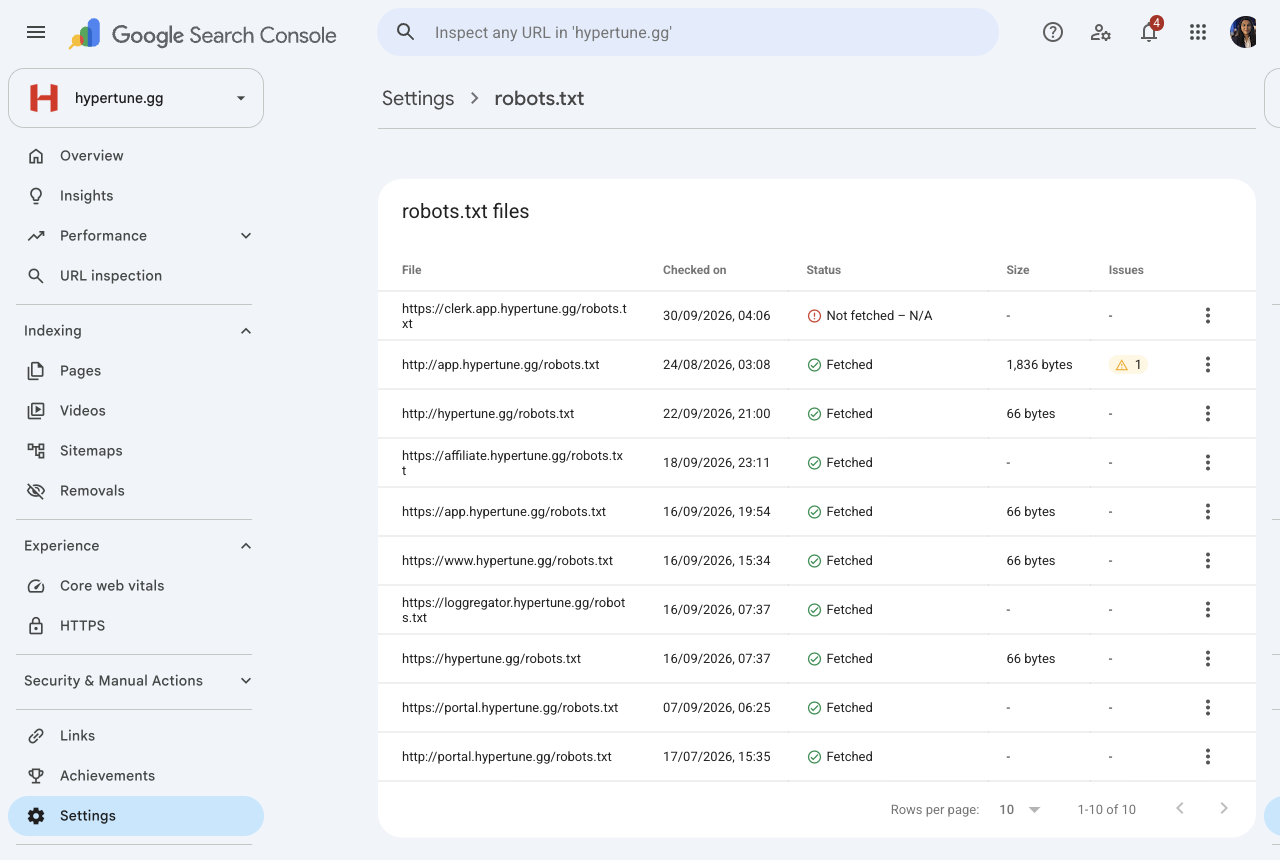
portal.hypertune.gg(786 impressions in the last 3 months) andaffiliate.hypertune.gg(96) show in search results, and neither tells Google to leave it out.loggregator.hypertune.gg, an analytics dashboard, had 1 impression; it should still be hidden. Search Console also listsclerk.hypertune.gg(the sign-in service, indexed with no content) among the 15 indexed pages; it needs hiding too if Clerk's settings allow it. - Austin decides first: whether customers should find the portal by searching, whether the affiliate landing page should be findable for "Hypertune affiliate program", and whether the logging site can go behind a login.
- Change: add the response header
X-Robots-Tag: noindex, nofollowto every response from the logging site, and from the portal and affiliate pages Austin wants hidden (on the affiliate site, at least the login and dashboard). A Cloudflare rule covers every page at once. Do not block these sites in robots.txt: Google has to be able to fetch a page to see thenoindex. - Done when: the response headers on each site show
x-robots-tag: noindex.
5. Point affiliate-code links at the clean page
- Due: Monday 12 October · Effort: under 1 hour
- Why: creator links add
?am_id=to URLs. The homepage already tells Google the clean URL is the real one (its canonical tag); the other pages need to do the same. Today the only?am_id=URLs in search are on sign-in and onboarding pages, which are already hidden, so this is a check to keep it that way. - Change: on every indexable page, the canonical tag is the URL without
?am_id=. Keepnoindexon/sign-in,/get-startedand/onboarding. - Done when:
/technology?am_id=testand/expert-tuning?am_id=testboth show a canonical without?am_id=.
6. Replace the compready.gg catch-all redirect with a list
- Due: Monday 12 October, or as soon as Austin finds where the redirect is set · Effort: 1 to 2 hours
- Why: every compready.gg URL, real or not, goes to
/expert-tuning. Google treats that as a broken page, so old links to the legal, FAQ and product pages pass little value. - Austin decides first: where the compready.gg redirects are set today and who can edit them, and whether unknown old URLs show a 404 or keep going to
/expert-tuning. - Change: one 301 per old URL from the table in Indexing fix specs section D.
compready.gg/andwww.compready.gg/stay on/expert-tuning. Do not set upenterprise.compready.gg: the 1,026 sites linking to it are spam, and it should stay switched off. - Done when: 5 to 10 old URLs from the table each return one 301 to their target.
7. New titles, descriptions and headings
- Due: Friday 9 October · Effort: 1 to 2 hours
- Not ready on Monday: Som sends the final table on Wednesday 7 October, after Bobby's keyword check. Austin signs off the homepage before it goes to Kamil.
- Change: update the title, meta description and main heading on every page in the final table, and add the image alt text it lists.
- Done when: each page's title and description match the final table.
8. Remove the claims that break the rules
- Due: Friday 9 October, with ticket 7 · Effort: 1 to 2 hours
- Why: the live site says "Trusted by Riot, EAC, BattlEye, Valve" (homepage and its meta description), "Trusted by Vanguard, FACEIT, EAC, and BattlEye" (/tutorial), "Verified by all major anti-cheats" and "used by Tier-1 pros" (/technology FAQ). It names creators (Shroud, Subroza, Tarik, ShaZam, Marved), and its before-and-after figures (130 to 210 FPS) show a 62% gain against the "up to 60%" claim.
- Austin decides first: the one anti-cheat statement he will stand behind; whether we have written permission for any creator names; and the corrected before-and-after figures.
- Change: Som writes the replacement lines once Austin has decided, and sends them with ticket 7. Kamil swaps them in.
- Done when: none of those phrases appears on the live site.
Later tickets, in priority order
No dates in the SEO plan beyond "each fix re-tested as it ships". Vinny and Austin set the order against Kamil's hours. Detail in Speed fix list.
| # | Ticket | Effort | Why |
|---|---|---|---|
| 9 | Load the mobile hero video after the page (intro_v2_mobile_compressed.mp4, 1.37 MB) |
1 to 3 hours | A third of the homepage's weight on phones |
| 10 | Load tracking tags after the page. Austin decides first: OK to test with one purchase and one affiliate visit, so affiliate and ad conversions still count | 2 to 4 hours plus testing | Tags block the phone for about 0.9 seconds on every page |
| 11 | Load the Clerk sign-in code only on sign-in and account pages | Half a day to a day | About 220 KB of unused code on every marketing page |
| 12 | Serve smaller images (AVIF and WebP, quality 75 to 80) | 1 to 2 hours | About 900 KB saved on the homepage |
| 13 | Split the main site script and load below-the-fold sections on scroll | 1 to 2 days | One file takes most of the phone's processing time |
| 14 | Drop old-browser code (modern browserslist targets) | Under 1 hour | About 47 KB less code |
Decisions for Austin, all in one place
Needed by Wednesday 7 October so Kamil can ship by Monday 12 October, unless marked.
- Old answer pages: redirect
/what-hypertune-changesand/uninstallto/technology? Is there a third page to remove? (ticket 2) - Game page URLs: what pattern will the new game pages use, and where does
/game/valorantpoint until its page exists? No other old game pages need redirects. (ticket 3) - Internal sites: should the portal be findable in search? Should the affiliate landing page be? Can the logging site go behind a login? (ticket 4)
- compready.gg: where are its redirects set, and who can edit them? Do unknown old URLs show a 404 or go to
/expert-tuning? (ticket 6) - Claims: which anti-cheat statement he will stand behind; written permission for any creator names; the corrected before-and-after figures. (ticket 8)
- Tracking test: OK for Kamil to test one purchase and one affiliate visit after moving the tags? (ticket 10, when it is scheduled)
- getmorefps.com: what is it, and is it still used? It forwards mostly spam links to the homepage. No ticket until he answers.
Two questions that are not for Kamil but are needed this week for the titles and the trust page:
- Price, trial and refund: confirm $59.99 a year and $9.99 a month (live on 4 Oct); is there still a free trial (the footer says "Try for free") or only the 7-day money-back guarantee (the
/technologyFAQ); which refund policy is right (the help centre makes it depend on an FPS check, the site FAQ does not, and the terms exclude renewals)? - Help centre: who at Hypertune fixes the six wrong help centre articles listed in Help centre facts to correct? They are edited in Freshdesk, not in the site code.
Titles, descriptions, H1s and copy
DraftWaiting on Bobby's keyword decisions (/technology keyword, homepage lead term). To Bobby Wed 7 Oct.
Read the full document
C1: Titles, meta descriptions, H1s, alt text and money-page copy
Hypertune · draft by Som · 3 October 2026 For Bobby to check against the keyword map on Wed 7 Oct. Austin signs off the homepage. Kamil publishes Fri 9 Oct.
Sources. Plan item C1 (owners and timeline, 2 Oct). Audit, 1 Oct: keyword map (5.2), cannibalisation (5.5), targets (5.6), what Google thinks the site is about (8.3), striking distance and CTR (8.4), priority keywords (9.1), images (10.7), on-page (11.1), content audit and briefs (16). Current titles, descriptions, H1s and images are taken from the saved page HTML of 1 Oct (raw/page_*.html, pages.json). Positions and impressions are Search Console, 27 Aug to 30 Sep, as quoted in the audit. No search volumes are used: they are still pending in the audit's map.
Updated 4 Oct after the Search Console and Ahrefs checks (V7 section G, V12 part 2):
- The homepage split holds: Search Console (3 months, all countries) has the homepage at 7.0 for "pc optimization for gaming" (504 impressions) and 8.4 for "pc optimization" (530).
- /technology: "cpu game optimizer" has no measurable search volume in Ahrefs. "pc optimization software" (400 global, difficulty 10) is the alternative for Bobby to choose between (question 1 below).
- Rows 5 and 6 (/what-hypertune-changes, /uninstall): only needed if Austin does not approve redirecting them to /technology (handover ticket 2). Neither page is indexed today.
- Rows 7 to 12 (the BIOS guides): none is indexed. V12 recommends merging them into one "best bios settings for gaming" page (700 global plus 600 for "bios settings for gaming"). If Bobby agrees, these rows wait for that decision.
- /pricing row corrected: the site now shows $59.99 a year (was $69.99 on 1 Oct) and a 7-day money-back guarantee instead of a free trial.
How to read this.
- 15 pages: every URL in the sitemap. /pricing is not in the sitemap and returns 404 today, so it has a separate conditional row at the end.
- One primary keyword per page, and no two pages share one. Where the keyword is not in the audit's keyword map, it is marked "to confirm with Bobby".
- Proposed titles are under 60 characters and descriptions under 155, counted with spaces. The count is in the last column.
- Where a current title or description contains an em dash, it is shown here as "(em dash)".
- Claims follow the rules: "up to 60%" only, no "trusted by", "endorsed" or "certified", no creator or pro names.
1. Titles, descriptions and H1s for every indexed page
Keyword split for the two priority pages
The "PC optimization" terms at positions 7 to 9 (audit 8.4) are split so the homepage and /technology do not compete:
| Page | Primary keyword | Position, impressions (audit) | Supporting terms the page can also use |
|---|---|---|---|
| Homepage | pc optimization for gaming | 7.0, 513 impressions, 36 clicks | pc optimization (8.5, 537), gaming pc optimization (7.8, 33) |
/technology |
cpu game optimizer | 8.7, 112 impressions, 0 clicks | ultimate windows optimization (8.2, 45) |
Left off both pages on purpose, because the keyword map gives them to new pages: "best pc optimizer for gaming" and "pc optimizer for gaming" (8.4 and 9.3) go to the fair comparison page; "optimize pc for gaming" and "how to optimize pc for gaming" (9.5 and 9.0) go to the C3 guide due Fri 16 Oct. "optimize pc" (9.9, 296) is not in the map: to confirm with Bobby whether it sits with the homepage or the C3 guide.
Main table
| # | URL | Current title | Current meta description | Current H1 (from the HTML) | Primary keyword | Proposed title | Proposed meta description | Proposed H1 | Reason | Chars (title / meta) |
|---|---|---|---|---|---|---|---|---|---|---|
| 1 | / (homepage) |
Hypertune (em dash) Ultimate PC Optimization for Gaming & Esports | Achieve higher FPS, cleaner performance, and minimal latency. Hypertune offers remote system tuning, BIOS tweaks, GPU overclocking (em dash) trusted by top-tier gamers. | Boost your gaming performance with one click. | pc optimization for gaming | PC Optimization for Gaming: Up to 60% More FPS | Hypertune | One-click PC optimization for gaming. Hypertune tunes your CPU, GPU, memory and Windows for up to 60% more FPS and less lag. Undo any change in one click. | One-click PC optimization for gaming | Puts the exact phrase Google already ranks the homepage for (7.0 and 8.5) first in the title and in the H1, which today is a slogan with no category in it; drops "trusted by" and the old remote-service wording. | 58 / 154 |
| 2 | /technology |
Five features behind one click | Hypertune | Hypertune installs like any other Windows app, reads your hardware once, and tunes it while you play. Nothing permanent, nothing inside your games. | Six H1 tags: "Five features behind one click." (with the intro paragraph inside it), "CPU Overclocking", "GPU Overclocking", "Windows Features", "Network Optimization", "Game Hub" | cpu game optimizer | CPU Game Optimizer: How Hypertune Tunes Your PC | How Hypertune's CPU game optimizer works, plus GPU overclocking, Windows, network and per-game tuning. Nothing permanent. See all five features. | CPU game optimizer: five features behind one click | The keyword map gives "cpu game optimizer" (8.7, 112 impressions, no clicks yet) to this page; the title has no keyword today. Keep one H1 and change the five feature headings to H2s. | 47 / 144 |
| 3 | /expert-tuning (low priority) |
Handtuned by Experts | Hypertune | Our engineers hand-tune your system at the hardware level: BIOS, overclocks, drivers, and configs tailored to your setup. | Eight H1 tags: "0+", "0+", "0+", "Two layers. One optimized PC.", "The HyperTune Advantage", "1ms", "673 FPS", "About Us" | pc optimization services (to confirm with Bobby: from audit 5.5, not in the 5.2 map) | PC Optimization Services, Hand-Tuned by Experts | Hypertune | Book a remote session with a Hypertune engineer. We hand-tune your BIOS, overclocks, drivers and configs for your exact PC, then benchmark the results. | PC optimization services, hand-tuned by experts | Light touch: traffic is a brand sitelink (16,325 impressions at 0.4% CTR, audit 8.4). Claims the one term split between this page (54.1) and the homepage (30.8) so the homepage stays on "for gaming". Fix the eight H1s, including the "0+" counters. | 59 / 151 |
| 4 | /tutorial |
Two minutes away from more FPS | Hypertune | Hypertune installs like any other app, reads your hardware, and tunes it while you play. Anti-cheat safe. Trusted by Vanguard, FACEIT, EAC, and BattlEye. | Two minutes away from more FPS. | how to use hypertune (to confirm with Bobby: from the audit content audit, not in the map) | How to Use Hypertune: Set Up in Two Minutes | Sign up, download, install, scan and optimize: set up Hypertune in five steps. It builds a profile for your PC, and a restore point lets you undo it all. | How to use Hypertune in two minutes | Removes "Trusted by Vanguard, FACEIT, EAC, and BattlEye", which breaks the claims rule. Matches what people want from a sitelink under a brand search: the steps. | 43 / 153 |
| 5 | /what-hypertune-changes |
What Hypertune changes on your PC | Hypertune installs like any other Windows app. It reads your hardware once and applies the performance settings you choose. Nothing it applies is permanent, and it does not change files inside your games. | What Hypertune changes on your PC | what does hypertune change (to confirm with Bobby: from the content audit) | What Hypertune Changes on Your PC, and How to Undo It | Every setting Hypertune can change, what it reads and never reads, and how to undo it. Nothing is permanent, and your game files are never touched. | Keep: What Hypertune changes on your PC | Current description is 204 characters and gets cut off. The undo section (step 10) is the reassurance searchers want, so it goes in the title. "Is Hypertune safe" stays free for the C2 trust page. | 53 / 147 |
| 6 | /uninstall |
Uninstall Hypertune | Hypertune is a standard Windows application, installed with hypertune-setup.exe. You can remove it from Windows the same way you remove any other app. You do not need a separate removal tool. | Uninstall Hypertune | how to uninstall hypertune (to confirm with Bobby: from the content audit) | How to Uninstall Hypertune on Windows 10 and 11 | Revert your optimizations in one click, then remove Hypertune like any Windows app. Steps for Windows 10 and 11, plus how to stop billing. | How to uninstall Hypertune | Matches the question form people search. The description now says what the page covers, including billing, which the current one leaves out. | 47 / 138 |
| 7 | /guides |
BIOS and setup guides | Hypertune | Beginner walkthroughs for AMD BIOS, BIOS updates, Intel XTU, and XMP. | None (no H1 tag; the only heading-like text is the page title) | bios guide for gaming (to confirm with Bobby: not in the map, no data) | BIOS Guides for Gaming PCs: XMP, EXPO, XTU | Hypertune | Free step-by-step BIOS guides: enable XMP or EXPO, update your BIOS and set up Intel XTU. Steps for ASRock, ASUS, Gigabyte and MSI boards. | BIOS guides for gaming PCs | Adds the missing H1 (audit 11.1). Current description is 69 characters; the new one names what is inside and the board brands covered. | 54 / 138 |
| 8 | /guides/amd-bios |
AMD BIOS Guide | Optimize your RAM performance and system stability by configuring memory overclocking settings in BIOS. This guide walks you through enabling XMP/EXPO/DOCP profiles and adjusting advanced DRAM timing parameters on ASUS motherboards. | None (no H1 tag; "AMD BIOS Guide" shows as styled text) | how to enable expo (to confirm with Bobby: not in the map) | How to Enable EXPO in an AMD BIOS | Hypertune | Enable EXPO or DOCP and set the DRAM refresh interval in your AMD BIOS. 4 steps, about 8 minutes, for ASRock, ASUS, Gigabyte and MSI boards. | How to enable EXPO in an AMD BIOS | Title had no brand and no task (audit 11.1). EXPO gives this page its own keyword, separate from the XMP guide. Current description says "ASUS motherboards" but the page covers four brands. | 45 / 140 |
| 9 | /guides/bios-update |
BIOS Update Guide | Keep your motherboard firmware up-to-date for improved stability, hardware compatibility, and performance. Follow the steps below for your specific manufacturer. | None (no H1 tag) | how to update bios (to confirm with Bobby: not in the map) | How to Update Your BIOS Safely | Hypertune | Find your motherboard model, download the right BIOS and flash it from USB. 12 steps, about 24 minutes, for ASRock, ASUS, Gigabyte and MSI. | How to update your BIOS | Question-form title with the brand. The description gives the steps and time from the page so people know what they are getting. | 42 / 139 |
| 10 | /guides/xtu-bios |
Intel XTU Guide | Prepare UEFI for Intel XTU: enable XMP, loosen power and undervolt locks, then save. Pick your motherboard brand and follow each step. | None (no H1 tag) | intel xtu bios settings (to confirm with Bobby: the audit gives it as an example, not in the map) | Intel XTU BIOS Settings: Step-by-Step Guide | Hypertune | Set up your BIOS for Intel XTU: enable XMP, loosen power limits and unlock undervolting. 6 steps, about 12 minutes, for ASRock, ASUS, Gigabyte and MSI. | Intel XTU BIOS settings | Uses the audit's example keyword for this guide. Also supports the planned "auto overclocking explained" and "vs Intel XTU" pages. | 55 / 151 |
| 11 | /guides/xtu-bios-vbs |
Intel XTU Guide with VBS | Prepare UEFI for Intel XTU: enable XMP, loosen power, then save. Pick your motherboard brand and follow each step. | None (no H1 tag) | intel xtu vbs (to confirm with Bobby: not in the map) | Intel XTU BIOS Settings with VBS On | Hypertune | Keeping Virtualization-Based Security (VBS) on? Set up your BIOS for Intel XTU: enable XMP and loosen power limits. 6 steps, about 12 minutes. | Intel XTU BIOS settings with VBS on | Nearly the same page as row 10. The VBS angle is the only thing that keeps the two from competing, so it leads the title. To confirm with Bobby whether to keep both or canonicalise this one to row 10. | 47 / 142 |
| 12 | /guides/xmp-bios |
XMP Guide | Load your memory kit's factory profile in UEFI so RAM runs at its rated speed. Choose your motherboard brand and follow the steps. | None (no H1 tag) | how to enable xmp (to confirm with Bobby: the audit gives it as an example, not in the map) | How to Enable XMP in BIOS: 2-Step Guide | Hypertune | Run your RAM at its rated speed. Enable XMP in your BIOS in 2 steps, about 4 minutes, with steps for ASRock, ASUS, Gigabyte and MSI boards. | How to enable XMP in BIOS | Uses the audit's example keyword. Question-form title, brand added, and a short time cost as the reason to click. | 51 / 139 |
| 13 | /cookies |
Cookie notice | Hypertune | Long legal text (415 characters), starting "This notice describes the cookies and similar storage used on hypertune.gg..." | Cookie notice | hypertune cookie notice | Keep: Cookie notice | Hypertune | Which cookies and similar storage hypertune.gg uses, when analytics and marketing storage are on, and how to change your choice in Cookie settings. | Keep: Cookie notice | Legal page, no search target. Only the description changes, so it is not cut off; harmless either way (audit 10.4). Optional. | 25 / 147 |
| 14 | /policy |
Privacy Policy | Hypertune | Long legal text (about 380 characters), starting "Welcome to Hypertune, a software product operated by COMPREADY Inc...." | Privacy Policy | hypertune privacy policy | Keep: Privacy Policy | Hypertune | How COMPREADY Inc. collects, uses, shares and protects your information when you use hypertune.gg and the Hypertune app. | Keep: Privacy Policy | Legal page. Shorter description only; optional. Its 4,341 impressions are a brand sitelink (audit 8.4), not a ranking target. | 26 / 120 |
| 15 | /terms-of-service |
Terms of Service | Hypertune | End User License and Terms of Use Agreement for the Hypertune software and platform services. | End User License and Terms of Use Agreement | hypertune terms of service | Keep: Terms of Service | Hypertune | Keep as is | Keep as is | Already short, clear and unique. No change. | 28 / 93 |
Conditional row: /pricing, only if the page goes ahead
/pricing returns 404 today with noindex, and is not in the sitemap. The plan says it gets its own title and description if it goes ahead. Every fact below is to confirm with Austin before it is used (see open questions).
| URL | Primary keyword | Proposed title | Proposed meta description | Proposed H1 | Reason | Chars |
|---|---|---|---|---|---|---|
/pricing |
hypertune price (audit brief; "is hypertune free, hypertune free trial, hypertune price" at 1.0 to 1.3, 852 impressions, 208 clicks) | Hypertune Pricing: Plans and Money-Back Guarantee | Hypertune costs $9.99 a month or $59.99 a year. Every plan has a 7-day money-back guarantee on your first payment. Cancel any time from your account. | Hypertune pricing | "Is Hypertune free" is the biggest brand question by volume (audit 8.2). Prices are the ones on the homepage on 4 Oct; the guarantee is from the /technology FAQ of 3 Oct, which no longer mentions a free trial. Austin confirms both (handover decision 8). |
49 / 150 |
2. Alt text on the money pages
Source: image tags in the saved HTML of 1 Oct. The audit counted missing alt text on 3 homepage images, 3 on /technology and 8 on /expert-tuning (10.7). Weak alt text is also listed. /pricing returns 404 and has no images.
Rule used: meaningful images get a short description of what they show. Decorative images (backgrounds, arrows, icons next to a text label) get an empty alt (alt="") so screen readers skip them. Descriptions are based on the file name and the section the image sits in: Kamil or Hoa should check each one against the actual image before it goes live.
Homepage
| File | Current alt | Proposed alt | Note |
|---|---|---|---|
blocks/problems/LowFPS.png |
OFF | Game running with Hypertune off, showing a lower FPS counter | Weak today. See open question on the 130 to 210 FPS figures next to this image. |
blocks/problems/HighFPS.png |
ON | Same game with Hypertune on, showing a higher FPS counter | Weak today. Kept free of numbers so the alt text makes no claim. |
blocks/showcase-2/optimization.png |
GPU Smart Autoclock | Hypertune app screen for one-click PC optimization | Current alt is wrong: this is the "Optimization" card, not GPU. Carries the primary keyword naturally. |
blocks/showcase/cpu-overclocking.png |
CPU Overclocking | Hypertune CPU overclocking screen | Fine; slightly more descriptive. |
blocks/showcase/gpu-smart-autoclock.png |
GPU Overclocking | Hypertune GPU overclocking screen | Fine; slightly more descriptive. |
blocks/showcase/memory-optimization.png |
Memory Optimization | Hypertune memory optimization screen | Fine; slightly more descriptive. |
blocks/showcase/network-optimization.png |
Network Optimization | Hypertune network optimization screen | Fine; slightly more descriptive. |
blocks/showcase/selective-features.png |
Selective Features | Hypertune screen for choosing which features to turn on | Fine; slightly more descriptive. |
blocks/showcase-3/showcase-3.png |
Showcase 3 | Hypertune app on a gaming PC | Weak. To confirm against the image. |
blocks/showcase-3/showcase-3-mobile.png |
Showcase 3 | Hypertune app on a gaming PC | Mobile version of the image above; same alt. |
blocks/showcase-3/marved.png |
Showcase | Leave empty (alt="") or remove with the quote |
Avatar beside a named user quote. Names are not allowed without Austin's written permission (open question). |
blocks/testimonials/shroud-min.png, subroza-min.png, tarik-min.png, shazam-min.png |
"[Name] Testimonial" | No alt proposed | Pro names are not allowed. The audit says these testimonials are moving off the homepage; Austin to decide (open question). |
blocks/footer/join_discord.png |
Missing | Join the Hypertune Discord community | Missing today. |
blocks/footer/join_creator.png |
Missing | Join the Hypertune creator program | Missing today. |
blocks/footer/join_team.png |
Missing | Join the Hypertune team | Missing today. To confirm this card is the careers link. |
blocks/footer/lightning-1.png, lightning-2.png, lightning-3.png |
Background Lightning 1, 2, 3 | Empty (alt="") |
Decorative. |
blocks/footer/crypto.svg |
Background Crypto | Empty (alt="") |
Decorative. The word "crypto" read aloud next to a PC app is unhelpful given the "does not mine cryptocurrency" reassurance on /what-hypertune-changes. |
testimonials/play-button.svg, play-button-brand.svg |
Play Video, Play Video Hover | Empty (alt="") |
Icons; the button itself should carry an "aria-label" such as "Play video". |
icons/hamburger.svg |
Hamburger Menu | Open menu | Says what it does. |
/technology
| File | Current alt | Proposed alt | Note |
|---|---|---|---|
technology-features/feature-1.png |
CPU Overclocking | Hypertune CPU game optimizer screen tuning processor speed | Carries the primary keyword. |
technology-features/feature-2.png |
GPU Overclocking | Hypertune GPU overclocking profile for your graphics card | |
technology-features/feature-3.png |
Windows Features | Hypertune screen for turning Windows gaming settings on and off | |
technology-features/feature-4.png |
Network Optimization | Hypertune network settings to lower ping and packet loss | |
technology-features/feature-5.png |
Game Hub | Hypertune Game Hub with settings profiles for each game | |
blocks/footer/join_discord.png, join_creator.png, join_team.png |
Missing | Same as the homepage | Shared footer: fixing it once fixes every page. |
| Footer lightning and crypto images | Background ... | Empty (alt="") |
Shared footer. |
/expert-tuning (low priority)
| File | Current alt | Proposed alt | Note |
|---|---|---|---|
hero/expert-tuning-background.jpg |
Missing | Empty (alt="") if it sits behind text; otherwise "Engineer tuning a gaming PC" |
To confirm against the image. |
how-it-works/background-whole.png |
Missing | Empty (alt="") |
Background. |
process/dots.png (3 times) |
Missing, but aria-hidden |
No change | Already hidden correctly. |
process/card-1/cpu.png, cpu-light.png (twice) |
CPU 1, CPU 2, CPU 3 | First: "Processor being tuned by Hypertune"; the two light versions: empty (alt="") |
Weak and repetitive. |
process/card-2/arrow-red-min.png, arrow-green-min.png, /arrow-up.svg (twice), icons/arrow-green-up.svg |
Arrow Red, Arrow Green, Arrow up | Empty (alt="") |
Decorative. |
process/card-2/screen-1-min.png, screen-2-min.png |
Manual Tuning Session (both) | "BIOS settings before expert tuning" and "BIOS settings after expert tuning" | To confirm which is before and after against the images. |
games/battlefield-6.png |
battlefield-6 | Battlefield 6 | Tidy the names. Each game appears three times (carousel); fix the source once. |
games/cs-2.png |
counter strike 2 | Counter-Strike 2 | |
games/call-of-duty-bo3.png |
call of duty | Call of Duty: Black Ops | To confirm the title shown in the image. |
games/overwatch.png, rust.png, valorant.png |
overwatch, rust, valorant | Overwatch 2, Rust, Valorant | To confirm Overwatch vs Overwatch 2 against the image. |
blocks/footer/join_*.png |
Missing | Same as the homepage | Shared footer. |
| Testimonial images (same four as the homepage) | "[Name] Testimonial" | No alt proposed | Same open question for Austin. |
techs/ajb.png, saiyan.png, markplayz.png, neo.png; aboutus/austin-min.jpg, thomas-min.png, team.png |
Names, Hypertune Team | No change | Staff and founders, which the audit wants named. To confirm with Austin that none of the technicians are also public creators. |
3. Above-the-fold copy: homepage and /technology
Only the headline and first paragraph. Everything else on the page stays as it is for now.
Homepage (primary keyword: pc optimization for gaming)
Current H1: "Boost your gaming performance with one click." Current first paragraph: "Hypertune is fully supported by every top anti-cheat. Get more frames, smoother gameplay, and less lag."
Proposed H1:
One-click PC optimization for gaming
Proposed first paragraph:
Hypertune tunes your CPU, GPU, memory and Windows settings for the games you play, for up to 60% more FPS, smoother frames and less lag. It never touches your game files, and you can undo every change in one click.
Why: the H1 and first line now say what the product is in the words Google already matches the page to (8.3, 8.4). Every claim is either "up to 60%" or taken from /what-hypertune-changes (no game files touched, restore point to undo). The anti-cheat line is dropped from the first paragraph until Austin confirms the wording (open question 1).
/technology (primary keyword: cpu game optimizer)
Current H1 (the intro paragraph sits inside the same H1 tag): "Five features behind one click. Hypertune installs like any other Windows app, reads your hardware once, and tunes it while you play. Nothing permanent, nothing inside your games."
Proposed H1:
CPU game optimizer: five features behind one click
Proposed first paragraph (as a normal paragraph, not inside the H1):
Hypertune is a CPU game optimizer and more. It installs like any other Windows app, reads your hardware once, then tunes your processor, graphics card, Windows settings, network and games while you play. Nothing is permanent, and nothing goes inside your games.
Why: the keyword goes in the H1 and the first sentence, the original "five features behind one click" idea stays, and the five feature names below become H2s, so the page has one H1 (audit 11.1).
Open questions
For Bobby (keyword map check, Wed 7 Oct)
- Homepage and
/technologysplit. I put "pc optimization for gaming" and "pc optimization" together on the homepage, as the audit map does, and gave/technology"cpu game optimizer". Ahrefs has no search volume for "cpu game optimizer" (Search Console shows 112 impressions, no clicks). Options for/technology: keep "cpu game optimizer", or use "pc optimization software" (400 global, difficulty 10; Razer Cortex ranks #1). Giving it "pc optimization" would compete with the homepage. Which do you want? - "optimize pc" (9.9, 296 impressions) is not in the audit map. Homepage, or the C3 "how to optimize your PC for gaming" guide?
- Keywords outside the audit map: "pc optimization services" for
/expert-tuning, the support pages (/tutorial,/what-hypertune-changes,/uninstall) and all six guide keywords. None have volume data yet. Please confirm or replace them from your map changes on Tue 6 Oct. - The two Intel XTU guides are nearly the same page. Keep both with the VBS angle, or canonicalise
/guides/xtu-bios-vbsto/guides/xtu-bios? - Brand at the end of the title. I end the titles with "| Hypertune" except on the homepage, where the brand is still there. Fine with your template?
For Austin (homepage sign-off and claims)
- Anti-cheat wording. The homepage says "fully supported by every top anti-cheat" and "Trusted by Riot, EAC, BattlEye, Valve, and more";
/tutorialsays "Trusted by Vanguard, FACEIT, EAC, and BattlEye"; the/technologyFAQ says "100% anti-cheat safe and used by Tier-1 pros". "Trusted by" is against the claims rule, and the others read as third-party endorsement. I have left anti-cheat out of the new copy. What wording, if any, do you approve? For example: "Works at the system level and never touches game files." - Before and after numbers on the homepage. The "Problem" block shows 130 FPS with Hypertune off and 210 FPS with it on. That is a 62% gain, which is above the "up to 60%" claim. Keep it, change it, or label it as an example?
- Creator names. The homepage testimonial H2 ("Trusted by some of the best to ever touch the game") names Shroud, Subroza, Tarik and ShaZam, and the "Marved" quote. The audit says these move to
/expert-tuning. Are they coming off the homepage before Fri 9 Oct, and do we have written permission for any of them? - BIOS wording.
/what-hypertune-changessays the app does not write BIOS memory profiles, and that BIOS hand tuning is Expert Tuning. So the homepage copy says "CPU, GPU, memory and Windows settings", not "BIOS". Is that right? - Homepage description mentions undo, not the guarantee. The 7-day money-back guarantee is only in the
/technologyFAQ, and the footer still says "Try for free". Should the guarantee go in the homepage description instead of "Undo any change in one click", and should the footer button change? - Pricing page facts, if it goes ahead: $9.99 a month and $59.99 a year (homepage, 4 Oct; it was $69.99 on 1 Oct), the 7-day money-back guarantee, and whether a free trial still exists. The plan notes old $4.99 and $47.99 prices are still on the help centre (V5).
AI content framework
DraftDrafted 4 Oct without waiting for Bobby's walkthrough: page structures from what ranks today, an SEO checklist in place of his check, and keyword defaults for Vin to approve (section 8). First page from it: CS2, drafted by Mon 12 Oct.
Read the full document
V8: AI content framework
For: Vin (review), Hoa (hand check), Austin (claims) From: Som Draft: Sunday 4 Oct 2026 · plan dates Tue 6 to Mon 12 Oct · first page from it: CS2 game page, drafted by Mon 12 Oct
The plan builds this from Bobby's walkthrough (B4) and has Bobby check every draft for SEO. This draft does not wait for him. The page structures come from what ranks today (V12 and the audit's briefs in section 16), and his SEO check is replaced by a written checklist that Som runs and Vin reviews (section 6). If Bobby joins later, his changes go into sections 3 and 6; nothing else needs to change.
What this covers: every page in C1 to C7 (titles and copy, the trust page, the gaming guide, 13 game pages, the low-FPS page, comparison pages and problem pages). What it does not cover: the content calendar (N1) and outreach.
1. How a page gets made
| Step | Who | Time | Output |
|---|---|---|---|
| 1. Brief | Som | 30 min | Filled brief (section 4) with keywords, what ranks, sources and links |
| 2. Facts pack | Som | 20 min | The fact sheet block (section 2) plus the page-specific sources pasted into one file |
| 3. Draft | AI, with Som | 45 min | First draft from the prompts in section 5 |
| 4. Test and fill | Som | 30 min | Settings checked on the current patch, screenshots, every [source needed] filled or cut |
| 5. SEO check | Som | 15 min | Section 6 checklist, ticked, pasted at the end of the draft |
| 6. Hand check | Hoa and Vin | 30 min | Facts, prices, claims, links, "reads like a person" (section 7) |
| 7. Claims sign-off | Austin | Every [Austin to confirm] line answered | |
| 8. Publish | Austin submits in Linear; Kamil publishes | ||
| 9. After it is live | Som | 10 min | Log it; request indexing in Search Console (Vin if Som's access is not Full); check it is indexed after 7 days |
About 3 hours of Som's time per page, which matches the plan's estimate for game and problem pages and keeps two pages a week.
2. Facts every page uses (the fact sheet block)
Paste this block into every drafting session. The AI may only state facts about Hypertune that appear here or in the page's own sources. It is copied from V13 and C2 and changes only when Austin signs off a change.
FACTS (as of 4 Oct 2026; [A] = Austin to confirm before publishing)
- Product: Hypertune, a Windows 10 and 11 app. Made by COMPREADY Inc., a US company. [A: legal name and state]
- Founders: Austin Copeland and Thomas Schappy, founded as CompReady in 2022. [A]
- What it does: reads CPU, GPU, memory and storage once; applies only the features the user turns on:
  CPU and GPU overclocking, faster memory settings, network tuning, Windows features, Game Hub profiles per game.
- Safety facts: stress-tests an overclock on the user's hardware and skips it if cooling cannot hold it;
  does not modify game code or put files in game folders; creates a Windows restore point; changes can be reverted in the app. [A: revert wording, see C2 editor note 1]
- CPU tuning: built on Intel's Extreme Tuning Utility (XTU) SDK, developed in collaboration with Intel. [A] AMD support [A].
- Price: $9.99 a month; $59.99 a year (shown against $119.88). [A]
- Refund: 7-day money-back guarantee on the first payment. [A: wording vs terms section 29E]
- Free trial: unknown. Do not mention a trial. [A]
- FPS claim: "up to 60% higher FPS; results vary by hardware and game". No other number.
- Anti-cheat line: "Hypertune works at the system and hardware level. It does not modify game code or inject files into game folders."
  Do not say it is safe with a named anti-cheat unless Austin confirms that system.

NEVER WRITE
- "trusted by", "verified by", "endorsed by", "certified", "100% safe", "ban-proof", "undetectable"
- "Intel-backed", "official Intel partner", any AMD partnership
- any FPS number other than "up to 60%" (not 40%, 41%, 42%, 18-140, 130 to 210)
- names of pros, streamers or creators, or testimonials (needs Austin's written permission)
- a free trial, a free version, or a price other than the two above
3. Page types
Six page types cover every planned page. Each one has a fixed order of sections; the AI drafts into that order and does not add sections.
General rules for every type:
- Answer first. The first one or two sentences answer the search, in words an AI answer can quote.
- Headings are the searches. H2s use the phrasings people search (from the brief), written as plain statements or questions.
- Free steps before the product. Every guide gives the manual steps in full; Hypertune appears in one section, as "or let Hypertune do steps X to Y", and links /technology. It never replaces the steps.
- Every number has a source and a date (audit article rules). Settings values come from the brief's sources or Som's own test, never from the model.
- Length: the median word count of the top 5 non-forum results for the primary keyword, measured at brief time. No padding to reach it.
- Byline and date: author name, "Last updated" date and, for game pages, the game patch version. [Austin to confirm who the named author is; the audit recommends named people, such as a CompReady engineer]
- Schema: Article with headline, author, datePublished, dateModified. No FAQPage (no rich result since 7 May 2026), no HowTo, no breadcrumbs (dropped in the plan).
3.1 Game page (C4)
URL: /games/[game] [Austin to confirm the pattern; handover decision 2. /game/valorant exists today]
Primary keyword: "best [game] settings pc" (V12 Part 2: the settings phrasing beats "fps boost" for almost every game).
Secondaries, always all of: "[game] best settings", "[game] fps boost", "[game] optimization", "[game] stuttering", "[game] low fps / fps drops", and "[game] launch options" where the game has them.
Title: Best [Game] Settings for PC: More FPS, Less Stutter | Hypertune (shorten to 60 characters).
| # | Section | What goes in it |
|---|---|---|
| 1 | H1 + answer | "The best [game] settings for FPS are ... " in two sentences, then a 5-line summary list of the biggest wins |
| 2 | Fix stutter and FPS drops first | The 3 to 5 causes for this game, most common first, each with the fix (the plan: each page opens with the stutter and low-FPS fixes) |
| 3 | Best in-game settings | Table: setting, competitive value, quality value, FPS impact (high, medium, low). Values from the brief's sources, checked on the current patch |
| 4 | Launch options (if the game has them) | Each option, what it does, whether it still works on the current patch |
| 5 | Windows and driver settings | Game Mode, power plan, GPU driver panel settings, fullscreen vs borderless, with exact clicks |
| 6 | Let Hypertune do it | Which of the above steps Hypertune automates, and what it adds that the manual steps cannot (overclocking, memory, Game Hub profile for this game). Facts block only |
| 7 | Is it safe with [anti-cheat]? | The anti-cheat line from section 2, the name of the game's anti-cheat, and a link to the trust page. Nothing more unless Austin confirms |
| 8 | Questions | 3 to 5 questions from Search Console, People Also Ask and Reddit for this game, each answered in two or three sentences |
Internal links out: games hub, trust page (/is-hypertune-safe), /technology, the gaming guide (C3), the game's problem page if it exists. Links in (for Kamil's ticket): games hub, homepage games section, the problem page, the gaming guide.
3.2 Problem page (C7, C5)
URL: /fix/[problem], for example /fix/cs2-stuttering [Austin to confirm]
Primary keyword: the exact problem phrase, for example "cs2 stuttering fix" or "low fps on high end pc".
| # | Section | What goes in it |
|---|---|---|
| 1 | H1 + answer | The most likely cause and the first fix, in two sentences |
| 2 | Quick checks (2 minutes) | 3 to 5 numbered checks anyone can do, fastest first |
| 3 | Fixes, in order | Numbered fixes from easiest to most involved; each: what to do, why it helps, how to tell it worked |
| 4 | When it is your hardware | Signs that the cause is temperature, RAM speed, or a bottleneck; how to check each with free tools |
| 5 | Let Hypertune do it | Which fixes Hypertune automates (facts block only) |
| 6 | Questions | 3 to 5 from the brief |
Links out: the game page, the gaming guide, trust page. Links in: the game page's stutter section, the low-FPS page (C5).
3.3 Comparison page (C6)
URL: /compare/hypertune-vs-[competitor], plus /compare/best-fps-booster [Austin to confirm]
Primary keyword: "hypertune vs [competitor]" or "[competitor] alternative"; "best fps booster for pc" for the roundup.
| # | Section | What goes in it |
|---|---|---|
| 1 | H1 + answer | Who each tool suits, in two sentences, fairly |
| 2 | Comparison table | Price, free plan, platforms, what each changes (software settings, overclocking, memory, network), undo, anti-cheat statement. Every competitor cell sourced from their own site on the date shown |
| 3 | Where [competitor] wins | At least two honest points (audit article rule: include where competitors win) |
| 4 | Where Hypertune wins | Facts block only |
| 5 | How we compared | Date checked, versions, links to each source, and that Hypertune wrote the page |
| 6 | Questions | 3 to 5 |
Rules: competitor prices and features are checked on their site the day the draft goes to Hoa, with a saved screenshot. No claims about a competitor's safety or ethics.
3.4 Guide (C3 and later how-to guides)
Examples: "how to optimize pc for gaming" (C3), "best bios settings for gaming", "cs2 launch options".
| # | Section | What goes in it |
|---|---|---|
| 1 | H1 + answer | The short version: the 5 to 8 steps as a numbered list, quotable on its own |
| 2 | Before you start | Restore point, what you need, how long it takes |
| 3 | Steps | One H2 per step. Each: what to do (exact clicks), why it helps, expected effect, any risk and how to undo it |
| 4 | Advanced (optional) | BIOS, XMP/EXPO, overclocking, with the risks stated plainly |
| 5 | Let Hypertune do it | Which steps it automates |
| 6 | Questions | 3 to 5 |
3.5 Answer page (pricing, benchmark method, trust page)
Use the audit's briefs (section 16, "Briefs for the priority pages") and the C2 draft as the model: H1 is the question, the answer in the first sentence, then sections that each answer one sub-question, then the questions block. These pages are mostly Austin's facts, so the AI only structures and words them.
3.6 Titles, descriptions and on-page copy (C1)
Already drafted in C1. Rules for any new title or description: primary keyword near the start, brand at the end of titles, titles 50 to 60 characters, descriptions 140 to 155 characters, one H1 per page, and no keyword used as the primary of two pages (check the keyword split in C1 and section 3 of this document).
4. Brief template
Fill one per page before drafting. Everything in it comes from Ahrefs, Search Console or the live results, not from the AI.
BRIEF: [page name]                          Type: [game | problem | comparison | guide | answer]
Planned URL:                                Publish week:
Primary keyword:            volume (US / global):        difficulty:
Secondary keywords (with volumes):
Search Console queries already showing for this topic (impressions, position):
Search intent (one line):

WHAT RANKS (top 5, non-forum, measured on [date]):
| # | URL | type (guide, list, vendor, forum) | words | what it has that we must match |
Median length of top 5: ___ words → target ___
AI Overview: yes/no; cited sources:
Reddit threads in top 10 (titles): → questions to answer

QUESTIONS TO ANSWER (from People Also Ask, Search Console, Reddit):
1.
2.
3.

SOURCES FOR FACTS AND SETTINGS (every value in the draft must trace to one of these):
- Official: [game patch notes, developer support pages, Microsoft, NVIDIA, AMD, Intel]
- Hypertune: the fact sheet block (section 2); [any Hypertune test data, with date]
- Som's own test: [PC spec, patch version, date]

INTERNAL LINKS OUT (from section 3 for this type):
INTERNAL LINKS IN (for Kamil's ticket):
OPEN QUESTIONS FOR AUSTIN:
Filled example: CS2 game page (first page, drafted by Mon 12 Oct)
| Field | Value |
|---|---|
| Planned URL | /games/cs2 [Austin to confirm pattern] |
| Primary keyword | best cs2 settings (the "best settings" phrasing, 2,100 global) |
| Secondary | cs2 fps boost (1,600 global; 100 US, difficulty 0); cs2 stuttering (1,400 global); cs2 stuttering with high fps (800); cs2 stuttering fix (300 global); cs2 optimization; cs2 low fps |
| Not on this page | "cs2 launch options" (5,200 global) gets its own guide later, so the two pages do not compete; this page has a short launch options section that links to it |
| CS2 total demand | 11,950 global searches a month across eight phrasings, the highest of any game (V12 Part 2) |
| What ranks for "cs2 fps boost" | Reddit #2, FPS Heaven guide #5, Hone /game/counter-strike-2 #6, a Steam guide, xplay.gg (V12 Part 1). FPS Heaven (authority 7) ranks #7 for launch options, so a small site can rank with specific settings |
| AI Overview | Yes; cites Reddit and YouTube |
| Anti-cheat | Valve Anti-Cheat (VAC). Section 7 uses the anti-cheat line only [Austin to confirm whether he will name VAC] |
| Sources for settings | Valve's CS2 patch notes and Steam support pages; NVIDIA and AMD driver documentation; Som's own test on the current patch (PC spec and date stated) |
| To measure before drafting | Word count of the top 5; current People Also Ask questions; the Reddit thread titles in the top 10 |
5. Drafting prompts
Run in one chat per page, in this order. Paste the fact sheet block and the filled brief at the start. Any capable chat model works; the rules below matter more than the model.
Prompt 1: setup
You are drafting a page for hypertune.gg, a Windows PC optimization app for gamers.
Write in plain, direct English for PC gamers: second person, short paragraphs, exact clicks and values.
Rules:
1. State facts about Hypertune only if they are in the FACTS block. Follow NEVER WRITE exactly.
2. Do not invent settings values, version numbers, statistics, prices or quotes. If the sources I give
   do not contain a value, write [source needed: what is missing] instead.
3. Copy any line marked [A] in FACTS with the tag [Austin to confirm] after it.
4. Use the section order for this page type exactly. Do not add sections, intros or conclusions.
5. Answer the search in the first two sentences.
6. No filler: no "in today's world", "ultimate", "game-changer", "unlock", "elevate", "seamless",
   no rhetorical questions, no summary at the end.
Reply "ready" and wait for the brief.

[FACTS block]
[Page type section from section 3]
Prompt 2: outline
Here is the brief: [brief]
Write the outline only: H1, every H2 and H3, and one line under each saying what it covers and
which source it uses. Use the secondary keywords as H2 phrasings where they fit naturally.
List any question from the brief you could not place.
Som checks the outline against the brief before going on: every secondary keyword placed, every question answered, nothing outside the page type.
Prompt 3: draft
Write the full page from the approved outline. Target [N] words.
Settings tables: only values found in these sources: [paste the source text or notes].
Mark every value with its source in brackets, for example (Valve patch notes, 1 Oct 2026); I will
remove the brackets after checking.
Prompt 4: self-check
Check your draft against the FACTS and NEVER WRITE lists and the rules. List every sentence that:
- states a Hypertune fact not in FACTS,
- uses a NEVER WRITE phrase,
- contains a number without a source,
- uses one of the filler words.
Do not rewrite the page; just list them with the fix.
Som applies the fixes by hand, then removes the source brackets only after checking each value.
6. SEO check (replaces Bobby's check)
Paste this at the end of every draft, ticked. Vin spot-checks it in his hand check.
| # | Check | How |
|---|---|---|
| 1 | Primary keyword is not the primary of another page | C1 keyword split and section 3 of this document |
| 2 | Title 50 to 60 characters, primary keyword near the start, "| Hypertune" at the end | Character count |
| 3 | Meta description 140 to 155 characters, contains the primary keyword | Character count |
| 4 | One H1, containing the primary keyword or a close variant | |
| 5 | Primary keyword in the first 100 words | |
| 6 | Every secondary keyword in an H2 or the first paragraph under one | |
| 7 | Answer in the first two sentences, quotable on its own | Read it alone |
| 8 | Length within 20% of the brief's target | Word count |
| 9 | Internal links out match section 3 for the type; anchor text describes the target page | |
| 10 | Links in listed for Kamil's ticket | |
| 11 | Images: descriptive file names and alt text; compressed (WebP, under 200 KB) | |
| 12 | URL is short, lowercase, hyphens, matches the agreed pattern | |
| 13 | Article schema fields filled; author and dates present |
|
| 14 | For Kamil: self canonical, indexable (no noindex), added to the sitemap |
Check after publishing |
| 15 | After publishing: request indexing; indexed within 7 days, or log it | Search Console URL inspection |
7. Hand check (Hoa and Vin)
From the plan: facts, prices, claims, links, and that it reads like a person wrote it. In practice: - Every Hypertune fact matches the fact sheet block, and every [Austin to confirm] is still tagged. - No NEVER WRITE phrase, including in image alt text and the meta description. - Every number has a source and a date; open three sources at random and check them. - Settings: the patch version on the page is the current one. - Every link works and goes to the right page. - Read the first screen aloud: if it sounds like an ad or like an AI summary, send it back.
8. Keyword decisions this framework makes (Vin to approve)
These were questions for Bobby (V12 and C1). With no walkthrough, the framework uses the defaults below. Vin approves or changes them; if Bobby joins later he can overrule any of them.
| # | Question | Default used | Why |
|---|---|---|---|
| 1 | Game page primary keyword | "best [game] settings pc", with fps boost, stuttering, low FPS and launch options as sections | Higher demand than "fps boost" for almost every game (V12 Part 2) |
| 2 | Game page order | CS2 and Arc Raiders first (both already in the 12 Oct week), then Battlefield 6, Apex Legends, Marvel Rivals, Fortnite, Valorant, Rust, Call of Duty, Escape from Tarkov, Overwatch 2, The Finals, WARDOGS | Demand order from V12 Part 2, two a week. Austin's dates for Fortnite and Rust override it. Deadlock (3,550 a month) only if Austin adds it |
| 3 | Problem pages | "cs2 stuttering fix" replaces "rust stuttering fix" | 300 against 10 global searches |
| 4 | /technology primary |
"pc optimization software" | "cpu game optimizer" has no measurable demand (C1 update) |
| 5 | BIOS guides | Merge the five into one "best bios settings for gaming" guide | None of the five is indexed; 700 plus 600 searches; depends on ticket 2 |
| 6 | CS2 launch options | Its own guide after the CS2 page, linked from it | 5,200 global searches, small sites rank |
| 7 | Homepage lead term | "PC optimization for gaming" | Already at position 7 (C1) |
9. Timeline
| Date | What | Hours (timesheet) |
|---|---|---|
| Tue 6 Oct | This framework reviewed by Vin; the walkthrough slot (1.5 h) is used to fill the CS2 and Arc Raiders briefs | 3.5 |
| Wed 7 Oct | Prompts tested on the CS2 brief; fixes to sections 3 and 5 | 2 |
| Thu 8 Oct | Topic map links and the fact sheet block checked against C2 and V13 | 2 |
| Fri 9 Oct | CS2 draft to Hoa and Vin; Vin's review of the framework | 2 |
| Mon 12 Oct | CS2 page through hand check; framework fixes from the first draft | 2 |
10. Open questions
For Vin: 1. Approve the keyword defaults in section 8, or change them. 2. Who replaces Bobby's other jobs that touch content: checking the keyword map (B2) and requesting re-indexing. This draft gives both to Som.
For Austin (add to the handover meeting): 3. URL patterns for game, problem and comparison pages (handover decision 2 covers games only). 4. The named author for guides and game pages. 5. Whether game pages may name each game's anti-cheat system, and which ones he confirms. 6. Whether Hypertune has test data per game that can be published (the benchmark method page). Without it, the "Let Hypertune do it" sections stay general.
Indexing fix specs
DoneAll parts written, including the Search Console findings (sections F and G).
Read the full document
V7: Indexing fixes, developer specs
For: Austin (decisions), then Kamil (build), via Linear From: Som Date: Mon 5 Oct 2026 Target: decisions from Austin this week; changes live Mon 12 Oct, when Bobby requests re-indexing (B5)
Sources: audit 1 Oct (sections 6.5, 8.5, 10.1, 10.3), the 2 Oct rerun in the plan (V7), and live checks on Sat 3 Oct. "Live 3 Oct" below means I checked the URL myself that day.
Four specs, in order of how much search traffic they affect:
- A. Pages being removed are still indexed and in the sitemap
- B.
/game/valorantis on a temporary redirect - C. Logging, portal and affiliate hosts and affiliate URLs show in search
- D. compready.gg sends every old URL to one page
One rule for all four: do not block any of these URLs in robots.txt. If Google cannot fetch a page, it cannot see the noindex or the redirect, and the URL stays in search.
A. Pages being removed, still indexed and in the sitemap
Problem
The "what Hypertune changes" and "uninstall" answers have moved into the /technology FAQ (V11). Live 3 Oct, /technology has an "Uninstalling Hypertune" section and a breakdown of what the app changes. The old pages still exist, return 200 with index, follow, and are still in the sitemap. The 2 Oct rerun shows them indexed. Google now sees two pages answering the same question.
| URL | Live 3 Oct | In sitemap | Proposed new home |
|---|---|---|---|
https://hypertune.gg/what-hypertune-changes |
200, index, follow |
Yes | https://hypertune.gg/technology |
https://hypertune.gg/uninstall |
200, index, follow |
Yes | https://hypertune.gg/technology |
| Third page: to confirm |
The plan mentions "three orphaned pages redirected". Only two are confirmed above. The third is to confirm with Vin (possibly /guides, the other page with no inbound links in the 1 Oct audit, but the audit recommends keeping the guides, so do not redirect it without a decision).
Change
- Add a permanent (301) redirect from each old URL to
/technology. - Remove the old URLs from
https://hypertune.gg/sitemap.xml. - Change every internal link that points at the old URLs (the footer links Hypertune added, and any FAQ links) to point at
/technology. - Leave
/technologyas it is: 200,index, follow, self-canonical.
Decisions for Austin
- Do you agree both pages redirect to
/technology, rather than staying live? - What is the third page to remove, if any, and where should it redirect?
- The footer currently links to these two pages. Should the footer now link to
/technology, or to an anchor on it (for example/technology#uninstall)? Either works for Google.
How to check it is fixed
- Each old URL returns 301 to
/technology(any redirect checker, or URL Inspection > "Test live URL" in Search Console). - Search Console > Sitemaps: re-submit
sitemap.xml; the discovered count drops by the number of removed pages. - Search Console > Pages: over 2 to 4 weeks the old URLs move to "Page with redirect".
- URL Inspection on
/technology> Request indexing (Bobby, B5).
B. /game/valorant on a temporary redirect
Problem
https://hypertune.gg/game/valorant was a game page that has been retired. On 1 Oct it returned 404 and was still indexed, with 435 impressions at average position 7.0 (Search Console). The 2 Oct rerun found a temporary (302) redirect. Live 3 Oct it returns 307 to / (also temporary). With a temporary redirect, Google keeps the old URL in its index and does not pass its value to the new page. Any backlinks to it are also not fully counted (audit 6.4).
Other old game URLs checked live 3 Oct return 404 with noindex: /game/fortnite, /game/rust, /game/cs2. Whether these were real pages with traffic is to confirm in Search Console. The full list of retired game URLs is also to confirm.
Change (pick one, see decisions)
- Option 1, restore: publish the new Valorant game page (C4, sixth in the game page order) at
/game/valorantitself. No redirect needed, and the page keeps its history. - Option 2, permanent redirect now: change the 307 to a 301 to the closest live page. Today that is
/(the homepage). When the new Valorant page goes live at a different URL, change the 301 target to that page.
My recommendation is option 2 now (a one-line change), and option 1 if the new game pages will use the /game/<name> pattern.
Decisions for Austin
- What URL pattern will the new game pages use:
/game/valorant,/games/valorantor something else? - Until the Valorant page exists, should
/game/valorant301 to the homepage, or to another page (for example/technology, which covers anti-cheat)? - Were there other
/game/...pages? If so, should each 301 to the homepage now and to its new game page later?
How to check it is fixed
/game/valorantreturns 301 (not 302 or 307). URL Inspection > "Test live URL" shows "Page with redirect".- Search Console > Performance > Pages, filter "game/valorant": impressions on the old URL fall over 2 to 4 weeks, and the target page picks up the Valorant queries.
- Search Console > Pages:
/game/valorantmoves to "Page with redirect".
C. Logging, portal and affiliate hosts, and affiliate URLs in search
Problem
Internal tools and affiliate link variants are in Google. Searchers can land on an analytics dashboard or a login page, and Google spends crawl effort on pages that should not rank.
| URL | Search Console (1 Oct) | Live 3 Oct | Proposed |
|---|---|---|---|
https://loggregator.hypertune.gg/ |
49 impressions, indexed | 200, title "Hypertune Analytics", no noindex; /robots.txt returns the app page, not a robots file |
noindex on every response |
https://portal.hypertune.gg/ |
957 impressions | 200, empty title, no noindex; /robots.txt returns the app page |
Decision 2 |
https://affiliate.hypertune.gg/ |
205 impressions | 307 to /login, "Hypertune Affiliates", no noindex |
Decision 3 |
https://waitlist.hypertune.gg/ |
Indexed | 404 with X-Robots-Tag: noindex |
Nothing to build; it will drop out |
https://hypertune.gg/sign-in?am_id=becca |
Indexed or showing impressions | 200, noindex, nofollow |
Already correct |
https://hypertune.gg/onboarding?am_id=junin |
Indexed or showing impressions | 307 to /get-started?am_id=junin, which is noindex, nofollow |
Already correct |
https://www.hypertune.gg/?am_id=valorant |
Showing in search caches | 301 to https://hypertune.gg/?am_id=valorant, canonical https://hypertune.gg |
Already correct |
The rest of the ?am_id= URLs (about 10 in total) |
Indexed or showing impressions | To confirm: full list needs a Search Console export | Same rule as above |
Change
- Logging host: add the response header
X-Robots-Tag: noindex, nofollowto every response fromloggregator.hypertune.gg(set at Cloudflare or the server, so it covers every path). Better still, put it behind a login. Serve a realrobots.txtthat allows crawling for now, so Google can see thenoindex. - Portal and affiliate hosts: for any host Austin does not want in search, the same
X-Robots-Tag: noindexheader on every response. - Affiliate URLs: keep
noindexon/sign-in,/get-startedand/onboarding. On every indexable page, the canonical must be the clean URL without?am_id=(the homepage already does this). Check the other indexable pages do the same. - After about 4 weeks, once Search Console shows these URLs as "Excluded by noindex tag", the internal hosts can be blocked in their own
robots.txtif Austin wants. - Optional, for speed: Search Console > Removals > New request, to hide a URL for about 6 months while the
noindextakes effect. This needs a Domain property in Search Console that covers the subdomains.
Decisions for Austin
- Does anyone outside the team need
loggregator.hypertune.gg? If not, can it go behind a login? - What is
portal.hypertune.gg(customer account, team or creator portal)? Should customers find it by searching "Hypertune portal", or should it benoindex? - Should
affiliate.hypertune.ggbe findable for people searching "Hypertune affiliate program"? If yes, keep the landing page indexable andnoindexthe login and dashboard pages only. If no,noindexthe whole host. - Is the Search Console property a Domain property (covers all subdomains) or a URL-prefix property for
https://hypertune.ggonly? The subdomain checks and removals need the Domain property.
How to check it is fixed
curl -I https://loggregator.hypertune.gg/(and portal, affiliate as decided) showsx-robots-tag: noindex.- URL Inspection > "Test live URL" on each host shows "Excluded by 'noindex' tag".
- Search Console > Pages > "Excluded by 'noindex' tag": the hosts and
?am_id=URLs appear there within 2 to 6 weeks. - Search Console > Performance > Pages, filter "am_id": impressions fall towards zero.
D. compready.gg sends every old URL to one page
Problem
Live 3 Oct, every compready.gg URL, real or made up, returns a 301 to https://hypertune.gg/expert-tuning. Checked: /, /pricing, /valorant, /faq, /blog and www.compready.gg/book. That is right for the old homepage and the tuning service pages, because expert tuning continues the CompReady service. It is wrong for the rest:
- Google treats many unrelated URLs redirected to one page as "soft 404s", so old links pointing at them pass little value.
- Old legal and FAQ pages land on a sales page instead of their match.
- "compready" is still searched (171 impressions in Search Console).
Old URLs found
From the Wayback Machine (public archive of compready.gg, 2022 to 2025). These are pages that existed, not necessarily pages with backlinks; that list needs Ahrefs Webmaster Tools.
| Old compready.gg URL | Proposed 301 target |
|---|---|
/ |
https://hypertune.gg/expert-tuning (as now) |
/book-now, /lets-get-started, /gaming-pc-optimization |
/expert-tuning |
/products, /collections, /collections/all, /collections/frontpage, /shop, /product |
/expert-tuning |
/products/full-optimization, /products/full-configuration, /product/full-configuration |
/expert-tuning |
/products/bios-configuration, /product/bios-configuration |
/expert-tuning (or /guides/bios-update: to confirm) |
/products/windows-configuration, /product/windows-configuration |
/expert-tuning |
/products/team-configuration |
/expert-tuning (or /team-form: to confirm) |
/products/valorant-optimization |
/expert-tuning now; the Valorant game page when live |
/products/counter-strike-2 |
/expert-tuning now; the CS2 game page when live |
/products/call-of-duty-black-ops-6 |
/expert-tuning now; the Call of Duty game page when live |
/pages/faq, /comp-faq, /home/comp-faq |
/expert-tuning (its FAQ covers the service) |
/getting-ready-for-your-optimization |
/expert-tuning, or the help article "How COMPREADY Optimization Works": to confirm |
/about, /pages/about, /home/about |
/ (no About page on hypertune.gg) |
/contact, /pages/contact, /home/contact |
To confirm (no contact page on hypertune.gg) |
/privacy-policy-3 |
/policy |
/terms-conditions |
/terms-of-service |
/limited-warranty |
/terms-of-service: to confirm |
/account, /account/login, /my-account, /account/lost-password |
/sign-in: to confirm whether old CompReady accounts carry over |
/blogs/news, /author/talk2play, /category/uncategorized, /product-category/uncategorized, /resources |
404 or 410 (no matching page) |
/cart, /checkout, /thank-you, /pages/thank-you, /coming-soon, /home/contest, /scrm, /search, /404-2 |
404 or 410 |
Any other URL (for example made-up /pricing, /valorant) |
404, or /expert-tuning if Austin prefers: see decision 1 |
Change
- Replace the single catch-all rule (probably in Cloudflare or the old host) with a list of 301 rules from the table above.
- Keep
compready.gg/andwww.compready.gg/going to/expert-tuning. - Send everything not on the list to a 404 (or 410) page, unless Austin chooses otherwise.
- Add the URLs that Ahrefs shows with backlinks, each to its closest match.
Decisions for Austin
- Unknown old URLs: 404 (cleaner for Google) or keep sending them to
/expert-tuning(keeps every stray visitor on the site)? - Old CompReady customer accounts: do they work on hypertune.gg
/sign-in, or should account URLs 404? - Contact pages: where should "contact" go: the help centre, an email address, or
/expert-tuning? - Where are the compready.gg redirects set today (Cloudflare, Shopify, another host), and who can edit them?
- Is compready.gg verified in Search Console? If so, use Change of Address or at least check its Pages report.
How to check it is fixed
- Spot-check 5 to 10 old URLs from the table in a redirect checker: each returns one 301 to its target, with no chain.
- A made-up URL (for example
compready.gg/test-123) returns 404 or the agreed target. - Ahrefs Webmaster Tools > Broken backlinks: no compready.gg links landing on 404s that should redirect.
- If compready.gg is in Search Console: Pages report shows the old URLs as "Page with redirect" or "Not found (404)" as intended, and hypertune.gg's Links report starts to show the old referring sites.
E. Backlink check from Ahrefs (added 3 Oct)
Ahrefs "pages by backlinks" for compready.gg and hypertune.gg, all subdomains, live links only. Raw data: raw-ahrefs/pages-by-backlinks.json, enterprise-compready-backlinks.json, top-hypertune-url-backlinks.json.
| URL | Referring domains | Live status (3 Oct) | What the links are | Action |
|---|---|---|---|---|
enterprise.compready.gg/ |
1,026 | No DNS record: does not resolve | Spam: nofollow links from SEO link-farm sites (fiverr-seo-.site, itxoft-.site, *.shop), first seen April to September 2026 | Leave it dead. Do not redirect it: a redirect would send this spam to hypertune.gg |
compready.gg/, www.compready.gg/ |
685 to 686 | One 301 to /expert-tuning (no chain) |
Mix: real links (Crunchbase, HotHardware, a podcast feed, the help centre) and the same spam | Keep as it is (section D) |
hypertune.gg/?am_id=valorant |
678 | 200, canonical to https://hypertune.gg |
Mostly spam aimed at getmorefps.com, which 301s to this URL; some dofollow links from casino and "dofollow backlinks DA" pages | Decisions 6 and 7 below |
www.hypertune.gg/expert-tuning |
432 | One 301 to hypertune.gg/expert-tuning |
Includes HotHardware and the help centre | None |
About 85 other ?am_id= URLs (creator codes) |
1 to 5 each | 200 with canonical to the homepage, or no data | Creator affiliate links | Covered by the canonical rule in section C |
affiliate.hypertune.gg/api/tr |
2 | 307 to /login |
Affiliate tracking | Covered by section C decision 3 |
No other old compready.gg URLs have live backlinks in Ahrefs, so the redirect table in section D is complete for links; the Wayback URLs are there for old bookmarks and Google's memory of them.
Decisions for Austin (added)
- What is getmorefps.com, and does anyone still use it? It forwards its links, mostly spam, to the homepage through
?am_id=valorant. Options: keep it (spam links are mostly nofollow and Google largely ignores them), or point it at a page that is not the homepage. - For Bobby: whether to disavow the dofollow casino and "dofollow backlinks" domains pointing at
?am_id=valorantand/expert-tuning. Sample inraw-ahrefs/top-hypertune-url-backlinks.json.
F. Search Console check (added 4 Oct)
Search Console performance by page, 4 July to 3 October, through the Ahrefs project linked to Search Console (28 URLs with impressions; Ahrefs may leave out URLs with very few impressions). Raw data: raw-ahrefs/gsc-pages-3-months.json. Live checks 4 Oct.
| Group | URLs | Impressions | What it means |
|---|---|---|---|
| Sign-in, sign-up, get-started, onboarding | 6 | 13,233 (32 clicks) | /sign-in, /sign-up and /get-started are already noindex, nofollow; the /onboarding links 307 to them. They will drop out as Google recrawls. Nothing to build |
?am_id= URLs |
6 | 496 | All on /sign-in and /onboarding, so already covered by the noindex above. None on content pages. app.hypertune.gg (a new host) 301s to hypertune.gg |
portal.hypertune.gg |
1 | 786 | Still indexable: ticket 4 stands |
affiliate.hypertune.gg |
1 | 96 | Ticket 4 stands |
loggregator.hypertune.gg |
1 | 1 | Barely appears now; low priority within ticket 4 |
/game/valorant |
1 | 159 (position 6.9) | The only /game/ URL with impressions, so no other old game pages need redirects |
/what-hypertune-changes, /uninstall |
0 | 0 | No impressions in 3 months; ticket 2 is about tidying, not traffic |
/creator-form, /team-form |
2 | 2,583 | Already noindex, follow; nothing to build |
G. Search Console reports (checked in Search Console, 4 Oct)
Screenshots: the screenshots in this report. Property is the domain property sc-domain:hypertune.gg (covers all subdomains). Som has user access, not owner. The index report was last updated 21 Sept, before the sitemap was submitted.
Pages indexed: 15. Not indexed: 381. Of the 15 indexed, only 8 are real site pages: /, /technology, /expert-tuning, /tutorial, /guides, /policy, /terms-of-service, /game/valorant. The other 7 should not be in Google: portal., affiliate., loggregator., clerk.hypertune.gg, waitlist.hypertune.gg (now 404s), /sign-in?am_id=becca, /onboarding?am_id=junin.
Not indexed, though they are in the sitemap and set to index: all 5 BIOS guides, /cookies, /uninstall, /what-hypertune-changes. Live check: each returns 200 with index, follow and a self canonical. Likely causes: thin pages (125 to 431 words) and the homepage does not link to /guides. Re-check after the next index update before raising it with Austin.
| Reason not indexed | Pages | What it is | Action |
|---|---|---|---|
| Crawled, currently not indexed | 159 | Mostly JS, CSS, font and animation files; also hypertune.gg//, //policy, //expert-tuning |
None. The double-slash URLs already 308 to the clean URL. Someone on the Hypertune side clicked "Validate fix" on this reason on 4 Oct (not Som); ask Austin who, so fixes are not validated twice |
| Page with redirect | 82 | Old redirected URLs | None |
| Duplicate without user-selected canonical | 66 | ?am_id= creator links, ?price-id=, ?utm_medium=Scamadviser.com, ?fbp= |
Covered by ticket 5 |
| Excluded by noindex | 35 | Sign-in, sign-up, forms | None, intended |
| Not found (404) | 32 | Random token-like paths (/SJPDlKBUMuP3B93ZcUfCA==), /mo, /month, /year, /contact |
None; /contact is the only real-looking one |
| Redirect error, 5xx, 403 | 1 each | app. token path, http://app. sign-in, loggregator./api/events |
None |
| Indexed without content | 1 | clerk.hypertune.gg/ |
Add to ticket 4 |
robots.txt: the one "critical error" is clerk.app.hypertune.gg/robots.txt not fetched. The main site's robots.txt is fine. No action.
Sitemap: https://hypertune.gg/sitemap.xml submitted 1 Oct, read 2 Oct, success, 15 pages.
Core Web Vitals: no data on mobile or desktop now (not enough Chrome traffic). Late August had 3 URLs (mobile "needs improvement", desktop "good"), dropping to 0 by early September. The V6 baseline must use PageSpeed lab scores.
Day-0 baseline (28 days to 3 Oct, web search): 11.3k clicks, 43.9k impressions, 25.6% CTR, average position 5.5. The top 10 queries are all brand ("hypertune" alone is 7,537 clicks).
compready.gg: Som has no access in Search Console. Ask Vinny or Austin whether it is verified.
What I still need
- ~~Search Console exports~~ Som has access since 3 Oct; page performance and indexed pages pulled 4 Oct (sections F and G). Still to export: the full list of 66
?am_id=duplicate URLs for ticket 5. - ~~Ahrefs: compready.gg and hypertune.gg pages with backlinks~~ Done 3 Oct, see section E.
- Austin's answers to the decision questions above, by Wed 7 Oct so Kamil can ship by Mon 12 Oct.
Official profiles list for sameAs
Draft, not sentSend to Bobby on Mon 5 or Tue 6 Oct.
Read the full document
V13: Official Hypertune profiles for Organization sameAs
For: Bobby (B3, Organization schema), due Tue 6 Oct 2026
From: Som
Checked: Sat 3 Oct 2026, public pages only, no logins
Sources: live hypertune.gg (3 Oct), saved crawl of 1 Oct (2026-10-01/seo-aeo/raw/), the audit (sections 9.3, 11.3, 12.1, 12.2), public profile pages and platform APIs
How to read this
- Ready: tied to Hypertune by at least one hard link (linked from hypertune.gg, or the profile links to hypertune.gg or to Hypertune's own short-link domain
hptn.gg). Safe to put insameAsnow. - Confirm first: very likely official, but we could not prove it without logging in. Vin or Austin to confirm before it goes in.
- Add later: profiles that do not exist yet or are planned under B8 and B11.
- Do not use: lookalikes and other companies called Hypertune.
About hptn.gg: it is Hypertune's own redirect domain. hptn.gg/twitter, hptn.gg/threads, hptn.gg/tiktok and hptn.gg/youtube all land on hypertune.gg/?am_id=<platform> (checked 3 Oct). A bio that links to hptn.gg is therefore controlled by Hypertune.
None of the profiles below shows a platform verified badge in the public page data we could read. X verification could not be checked without logging in.
1. Ready for sameAs
| Platform | URL for sameAs |
How we verified it | Notes |
|---|---|---|---|
| X (Twitter) | https://x.com/hypertune_ | Linked in the hypertune.gg footer on every page (live 3 Oct and 1 Oct crawl). Bio links hptn.gg/twitter and discord.gg/hypertune; "Made by COMPREADY"; joined July 2022 (public mirror) |
Bio says "Working with @AMD @intel" and older posts say "Officially Partnered with @AMD @intel" and "up to 40%+" / "up to 41%". These clash with the claims rules and the site; see section 5 |
| YouTube | https://www.youtube.com/@HYPERTUNEGG | /tutorial links the setup video youtube.com/watch?v=BU8GxBGGddI; YouTube's oEmbed names its channel as "Hypertune", @HYPERTUNEGG. Channel page links hptn.gg/youtube. Channel ID UCRYxkyvKJY9-PBmrt4TV8nA |
Channel description: "Partnered with AMD & intel. Boost your FPS For FREE". Older indexed videos still point to compready.gg (audit 12.2). Optional: also use https://www.youtube.com/channel/UCRYxkyvKJY9-PBmrt4TV8nA, which survives a handle change |
| Discord | https://discord.gg/hypertune | Linked from hypertune.gg as discord.com/invite/hypertune (footer and "Join Discord" on every page). Discord's public invite API: server "HYPERTUNE", Community and Discoverable server, vanity URL hypertune, description "The official home of Hypertune." About 5,338 members on 3 Oct |
The site says "10,000+ gamers" in the community block; Discord shows about 5,300 members. Either the 10,000 counts something else or it needs updating (section 5) |
| https://www.linkedin.com/company/compready | Linked in the hypertune.gg footer on every page | The company page is still named COMPREADY. Fine for sameAs because the Organization is COMPREADY Inc., but renaming or a Hypertune showcase page would help the brand match |
|
| TikTok | https://www.tiktok.com/@hypertune_ | TikTok's public profile data: name "HYPERTUNE", bio link discord.gg/hypertune, about 51,000 followers, 477 videos, not verified. Hypertune runs hptn.gg/tiktok. TikTok's oEmbed for old @hypertunegg videos now returns @hypertune_, so the account was renamed |
Bio: "Partnered with AMD & intel!". @hypertunegg on TikTok no longer exists, so do not use that handle |
| Threads | https://www.threads.com/@hypertunegg | Bio link hptn.gg/threads, which lands on hypertune.gg/?am_id=threads |
Posts say "users have seen up to 40%+ Boosts in FPS" (section 5) |
2. Confirm first
| Platform | Candidate URL | Why it is likely | What is missing |
|---|---|---|---|
| https://www.instagram.com/hypertunegg/ | Threads accounts carry the same handle as the Instagram account they are created from, and Threads is @hypertunegg |
Instagram blocks scripted checks (401). Vin to open it and confirm the bio links hypertune.gg or hptn.gg | |
| Trustpilot (Hypertune) | https://www.trustpilot.com/review/hypertune.gg | Vinny says the Trustpilot page was updated from COMPREADY to Hypertune (audit 12.2) | Trustpilot blocks scripted checks (403), so not re-verified. Confirm the URL and that it is claimed by the company |
| Trustpilot (old COMPREADY) | https://www.trustpilot.com/review/compready.gg | Search index shows "COMPREADY", 4.7 from 27 reviews, describing the manual tuning service (2024 copy, founders listed by gamer tags) | If this is the page that was renamed, use one URL only. Reviews here are about the CompReady service, so no aggregateRating for the app from it (audit 12.2) |
| Crunchbase | https://www.crunchbase.com/organization/compready | A company-data index lists this as COMPREADY's Crunchbase page, with homepage hypertune.gg | Crunchbase timed out for us. Confirm it exists, shows hypertune.gg, and is claimed. Do not confuse with /organization/hypertune (section 4) |
3. Add later (not live yet)
| Profile | Owner | When |
|---|---|---|
| Product Hunt product page | Bobby, B8 | After submission, 12 to 30 Oct. The slug hypertune is taken by hypertune.com (section 4), so ours will need a different name or slug |
| AlternativeTo, SaaSHub, G2 or Capterra | Bobby, B8 | After each listing is approved |
| Wikidata item | Bobby, B11 | November. Add the https://www.wikidata.org/wiki/Q... URL once created |
| Som, V20 | No official subreddit or account found (Reddit blocks scripted checks; search found none). Add the labelled official u/ account once it is set up |
4. Lookalikes and "Hypertune" confusion: do not use
| Profile | What it actually is | Risk |
|---|---|---|
https://www.hypertune.com, docs.hypertune.com, the hypertune npm package |
Hypertune Ltd, London: feature flags and A/B testing for developers | The main reason for sameAs. It outranks hypertune.gg for a bare "Hypertune" search (audit 9.3) |
| https://www.crunchbase.com/organization/hypertune | Hypertune Ltd (hypertune.com), London, founded 2022, pre-seed from Afore Capital, Jul 2022 | Easy to grab by mistake. Its funding round is not ours. Any directory or AI answer that says "Hypertune raised pre-seed from Afore" is mixing the two |
| https://www.producthunt.com/products/hypertune | hypertune.com's product page ("feature flags, A/B testing, analytics") | Same name taken on Product Hunt |
| github.com/polyaxon/hypertune | Unrelated open-source machine learning project | Shows in brand search results |
| https://www.tiktok.com/@hypertune | Unrelated personal account ("Leeew", 57 followers, no videos) | Lookalike handle |
| compready.com | A site called "Comp Ready" that is not part of the hypertune.gg redirects (audit 10.1 checks). We could not tie it to COMPREADY Inc. | Austin to confirm whether it is ours. Do not use until then |
| Wikidata Q105857180 | A file format called "Hypertune" | Only existing "Hypertune" item (audit 12.1) |
| hypertune.freshdesk.com | Our own help centre, titled "compready" | Ours, but a support site, not a profile. Leave it out of sameAs; it goes in the fact sheet as the support URL |
Staff and technician X accounts linked from /expert-tuning, and founder personal accounts |
Individuals | Not the Organization. One company-data index lists a technician's X account as the company's Twitter; that is wrong |
| serchen.com/company/hypertune-2 | Third-party directory listing for our app | Not ours to cite. Its copy says the app is "endorsed by professional esports players", which breaks the claims rules; ask for a correction when B8 runs |
5. Issues found while checking (for Austin, via Vin)
- Social bios make claims the site does not. X, YouTube and TikTok bios say "Partnered with AMD & intel" or "Officially Partnered with @AMD @intel". The site only says "We collaborate closely with chipmakers" and "Powered by official Intel and AMD toolkits". The press covers Intel (XTU SDK, Intel engineer quoted) but none of it mentions an AMD partnership. Austin to confirm the approved wording, and the bios should match it once
sameAspoints engines at them. - Old FPS numbers on socials. "Up to 40%+" (X, Threads) and "up to 41%" (X) contradict the "up to 60%" rule.
- "Free" in bios. YouTube says "Boost your FPS For FREE"; X says "Boost your FPS FREE for 7 days". On 3 Oct the
/technologyFAQ no longer mentions a free trial and says "Every plan comes with a 7-day money-back guarantee". Austin to confirm whether the free trial still exists. - Community size. The site says "10,000+ gamers"; Discord shows about 5,300 members.
6. Suggested sameAs block for B3
Ready entries only. Add the "Confirm first" URLs once Vin confirms them.
{
  "@context": "https://schema.org",
  "@type": "Organization",
  "@id": "https://hypertune.gg/#organization",
  "name": "Hypertune",
  "legalName": "COMPREADY Inc.",
  "url": "https://hypertune.gg",
  "logo": "https://hypertune.gg/icons/hypertune.svg",
  "sameAs": [
    "https://x.com/hypertune_",
    "https://www.youtube.com/@HYPERTUNEGG",
    "https://discord.gg/hypertune",
    "https://www.linkedin.com/company/compready",
    "https://www.tiktok.com/@hypertune_",
    "https://www.threads.com/@hypertunegg"
  ]
}
Notes for Bobby:
- name versus legalName depends on Austin: today's markup names "COMPREADY Inc." as publisher. Austin to confirm the exact legal name and whether the Organization should be named Hypertune with COMPREADY Inc. as legalName.
- Google prefers a raster logo (PNG, at least 112 x 112). The site has only the SVG and the favicon; ask Austin for a square PNG logo URL.
Content calendar
Not startedBuilt from Bobby's method after the walkthrough call.
Trust page draft
DraftDraft due Fri 9 Oct; live Mon 12 Oct.
Read the full document
C2: Trust page draft ("Is Hypertune safe?")
For: Bobby (SEO check), Hoa and Vin (fact check), Austin (sign-off) From: Som Draft due Fri 9 Oct 2026; live Mon 12 Oct 2026 (Kamil publishes from Austin's Linear ticket) Draft date: Sat 3 Oct 2026
Sources: only the site and the audit. Live hypertune.gg on 3 Oct (homepage, /technology FAQ); saved crawl of 1 Oct (/what-hypertune-changes, /uninstall, /policy, /terms-of-service, /tutorial, /expert-tuning); audit sections 8.2 (trust queries), 11.2 to 11.4, 12.1 and 12.2, and the "Is Hypertune safe" and benchmark briefs in section 16. (The plan points to "audit section 17" for the trust brief; in the audit the brief is in section 16 and section 17 is outreach.)
Every line marked [Austin to confirm] must be signed off before it goes live. Lines without the tag are copied or closely paraphrased from a live page on hypertune.gg.
SEO fields
| Field | Proposal | Length |
|---|---|---|
| URL | /is-hypertune-safe (Bobby to check against the keyword map; /trust is the fallback) |
|
| Title tag | Is Hypertune Safe? Who Makes It and What It Changes | 51 characters |
| Meta description | Who makes Hypertune, exactly what it changes on your PC, how to undo it, how to cancel and get a refund, and how your data is handled. | 134 characters |
| H1 | Is Hypertune safe? Who makes it, what it changes and how to undo it | |
| Primary keyword | is hypertune safe (97 impressions, position 1.5) | Audit 8.2 |
| Secondary keywords | is hypertune legit (345), hypertune reviews (182), does hypertune work (225), is hypertune good / worth it (193), hypertune crack (193), hypertune intel (472) | Audit 8.2 |
| Schema | WebPage with about pointing to the Organization @id from B3. FAQPage is optional; it no longer earns a rich result (audit 11.3) |
Page copy
Is Hypertune safe? Who makes it, what it changes and how to undo it
Hypertune is a Windows app made by COMPREADY Inc., a US company. It applies only the settings you turn on, it does not change files inside your games, and it creates a Windows restore point so you can revert its changes in the app. [Austin to confirm the last clause; see editor note 1]
This page covers who makes Hypertune, what it changes on your PC and how to undo it, how to cancel and get a refund, how we work with Intel, and how we handle your data.
Who makes Hypertune
Hypertune is made by COMPREADY Inc. Austin Copeland and Thomas Schappy co-founded the company as CompReady in 2022. CompReady tuned gaming PCs by hand, one machine at a time, and Hypertune is the Windows app built from that work.
CompReady still runs as our hands-on service: Expert Tuning is a remote session where one of our engineers tunes your BIOS and hardware. That is why our help centre and some older pages still carry the CompReady name, and why the old address compready.gg now opens our Expert Tuning page.
- Company: COMPREADY Inc., a company in the United States [Austin to confirm: legal name, state and whether to add a business address]
- Founded: 2022 [Austin to confirm]
- Contact: info@hypertune.gg
- Community and support: our Discord at discord.gg/hypertune, and the help centre at hypertune.freshdesk.com
What Hypertune changes on your PC
Hypertune installs like any other Windows app. It reads your hardware once and applies the performance settings you choose. You choose which features to turn on, and Hypertune does not apply a change you left off.
| Area | What Hypertune can change, if you turn it on |
|---|---|
| Processor | Uses official Intel and AMD toolkits to find a faster stable speed for your processor. It stress-tests that speed on your hardware, and if your cooling cannot hold it, Hypertune does not apply it. [Austin to confirm AMD CPU support] |
| Graphics | Tunes your graphics card. The profile can raise the clock, memory clock, voltage and power limit, and it is built for your GPU. |
| Memory | Adjusts memory settings so RAM runs at a faster, lower-latency configuration. It does not write BIOS memory profiles such as XMP, EXPO or DOCP. |
| Windows | Toggles Windows features and settings that affect gaming. You can turn them back off in the app. Hypertune does not replace Windows. |
| Network | Adjusts network settings to reduce lag and packet loss. It does not change your browser homepage, search engine or toolbars, and it does not redirect your traffic. |
| Games | Game Hub applies settings profiles for individual games. Hypertune does not modify game code and does not put files in a game folder. |
What Hypertune reads to build your profile: your CPU, GPU, RAM and storage type; your Windows version; driver versions that matter for performance tuning; and which Hypertune features you use.
What Hypertune never does:
- Mine cryptocurrency or use your PC for distributed computing
- Collect personal files, browsing history, keystrokes or what is on your screen
- Change your browser homepage, default search engine or toolbars
- Edit or inject game files
- Apply a feature you did not turn on
Windows asks for admin rights when you install Hypertune, because the app needs to talk directly to your hardware.
The full list, kept up to date, is on What Hypertune changes on your PC.
How to undo Hypertune's changes
- Revert in the app. Open Hypertune and revert the optimizations you applied. This uses the restore point Hypertune created to undo the settings the app applied.
- Then uninstall, if you want to remove the app. Hypertune is a standard Windows app (installed with
hypertune-setup.exe) and uninstalls the normal way: - Windows 11: Settings, then Apps, then Installed apps. Find Hypertune, open the menu next to it and choose Uninstall. - Windows 10: Settings, then Apps, then Apps & features. Find Hypertune and select Uninstall. - If Hypertune is still listed, restart your PC and repeat the steps. - Revert before you uninstall. If you uninstall first, the settings Hypertune applied are not reverted for you. [Austin to confirm]
Uninstalling does not cancel your subscription. To stop billing, cancel from your account on hypertune.gg (see the next section).
[Austin to confirm, see editor note 1]: whether anything stays after reverting and uninstalling (for example the Intel and AMD tuning drivers, or Windows Update settings), and what happens to applied settings if your subscription ends. Add one plain sentence for each answer here.
Step-by-step guide: Uninstall Hypertune.
How to cancel and get a refund
Cancel: sign in at hypertune.gg and cancel from your account dashboard. Cancel at least 24 hours before your trial ends or your subscription renews, or you may be charged for the next period. Our system logs, in UTC, are the record of when you cancelled.
Refund: every plan comes with a 7-day money-back guarantee on your first payment. If you are not satisfied, email support@compready.net within 7 days of your first payment with your name, purchase date and order details. [Austin to confirm wording; see editor note 2]
What the guarantee does not cover:
- Renewal charges after your first billing period are not refundable.
- We may decline a refund if the software shows significant active use during the refund window. [Austin to confirm whether this stays on the page and how it is applied]
Free trial: [Austin to confirm: does a free trial still exist, how long, and is a card needed to start it?] If there is a trial, you authorise us to charge your card when it ends unless you cancel at least 24 hours before.
Prices: $9.99 a month, or yearly at the price shown on our pricing page. [Austin to confirm; link /pricing once it is live]
The full terms are in section 29 of our Terms of Service.
Hypertune and Intel
[Austin to confirm this whole section, ideally with wording Intel has approved.]
Hypertune's CPU tuning is built on Intel's Extreme Tuning Utility (XTU) software development kit, developed in collaboration with Intel. Hypertune is our product, not an Intel product. On AMD processors, Hypertune uses AMD's official toolkits. [Austin to confirm]
[Editor note, not for publishing: today the site describes this only as "We collaborate closely with chipmakers" (homepage) and "Powered by official Intel and AMD toolkits" (/technology). If Austin can publish proof, such as a quote from Intel or a link to Intel's announcement, add it here (audit action 13). Do not write "Intel-backed", "endorsed by Intel", "certified by Intel" or "official Intel partner".]
Privacy and safety
What we collect: your name and email; account and subscription details; payment information, handled by our payment processors (Stripe or PayPal); your messages to support; your CPU, GPU, RAM, storage type and Windows version; driver versions that matter for tuning; and how you use Hypertune's features.
What we do not collect: personal files, browsing history, keystrokes, screen contents, or any data unrelated to system performance.
Who we share it with: we do not sell, rent or trade your personal information. We use service providers to run Hypertune: Clerk (accounts), Stripe and PayPal (payments), Klaviyo (service emails about payments), Freshdesk (support), Sentry (error reports) and our hosting providers. Advertising and analytics tools run only as set out in our cookie notice.
Where it is processed: COMPREADY Inc. is a US company, and account, billing, support and telemetry data are processed in the United States.
Your choices: you can ask to access, correct, delete or export your data by emailing info@hypertune.gg. We aim to reply within 30 days. You can change cookie choices at any time from Cookie settings at the bottom of every page.
No crypto mining: Hypertune does not mine cryptocurrency and never uses your CPU, GPU or network for anything except the optimization and diagnostics you start.
Download Hypertune only from hypertune.gg. The official installer downloads after you sign in on hypertune.gg. Copies from other sites, including "cracked" versions, do not come from us and we cannot say what is in them. [Austin to confirm]
Anti-cheat: Hypertune works at the system and hardware level. It does not modify game code or inject files into your game folder. [Austin to confirm the statement on anti-cheat compatibility he is willing to stand behind, naming the anti-cheat systems only if each one is confirmed. Do not use "trusted by", "verified by" or "100% safe".]
Read the full Privacy Policy and Cookie notice.
Questions people ask about Hypertune
Is Hypertune legit?
Yes. Hypertune is a paid Windows app from COMPREADY Inc., the US company behind the CompReady PC tuning service, founded in 2022 by Austin Copeland and Thomas Schappy. We publish what the app changes, how to undo it, and our cancellation and refund terms, and you can reach us at info@hypertune.gg or on our Discord. [Austin to confirm]
Hypertune reviews: what do people say?
Hypertune's public release in September 2026 was covered by GamesBeat, Tom's Hardware, TweakTown and HotHardware, among others. Most reviewers had not tested it themselves yet; they described how it works and questioned the "up to 60%" figure and the subscription model. You can read customer reviews on our Trustpilot page. [Austin to confirm: the press summary, whether to link the articles, and the Trustpilot URL. Do not quote creator or pro testimonials without Austin's written permission.]
Does Hypertune work?
It depends on your hardware and the games you play. Hypertune reads your CPU, GPU, memory and storage and builds a profile for your exact setup instead of generic settings. Users see up to 60% higher FPS, and results vary by system and game. [Austin to confirm; link the benchmark method page once it is live] The simplest test is your own PC: note your FPS before, apply the features you want, compare, and use the 7-day money-back guarantee if it is not worth it to you. [Austin to confirm]
Is Hypertune safe?
Hypertune applies only the features you turn on and does not edit game files. Before applying an overclock it stress-tests your hardware, and it skips the change if your cooling cannot hold it. It creates a Windows restore point so you can revert its changes in the app. It does not mine cryptocurrency or collect personal files, browsing history, keystrokes or screen contents. [Austin to confirm, in particular the revert line; see editor note 1]
Editor notes (not for publishing)
- Reversibility needs Austin before launch. The site says "Nothing permanent" (
/technology) and that settings can be reverted with one click. A security researcher's post, seen through a public mirror of Hypertune's X replies on 3 Oct and not verified by us, says: the Intel and AMD kernel drivers the app installs are set to start automatically even when Hypertune is not running, they stay after uninstalling, and the app changes a Windows policy that turns off automatic Windows Updates. If any of that is true, the page must say so plainly (and ideally the uninstaller should remove the drivers and restore Windows Update). The press also asked "what happens when you stop paying?" (HotHardware, audit 12.1); the page should answer it. - Refund wording conflict.
/technology(3 Oct) says "request a full refund within 7 days of your first payment". The terms (section 29E) let us refuse a refund for "significant active processing, usage, or data utilization". A buyer who used the app for a week would read these differently. One wording, then align both pages. - Free trial changed between 1 and 3 Oct. On 1 Oct the
/technologyFAQ promised a 7-day free trial; on 3 Oct it promises a money-back guarantee instead, while the footer still says "Try for free". XenoSpectrum reports Tom's Hardware readers being charged at sign-up despite the trial. The page should state whichever is true. - "Does it work" numbers. The audit (11.2) notes the press checked "up to 60%" against Hypertune's own data and found 4.3% to 28.2%, mostly from Game Hub graphics presets. The claims rule allows "up to 60%" only, so the draft uses that. Austin may prefer to show the measured range with the method; that belongs on the benchmark method page.
- Site copy that breaks the claims rules (for C1, not this page): "Trusted by Riot, EAC, BattlEye, Valve, and more" (homepage), "Trusted by Vanguard, FACEIT, EAC, and BattlEye" (
/tutorial), "Verified by all major anti-cheats" (/tutorial), "100% anti-cheat safe and used by Tier-1 pros" (/technologyFAQ), the creator testimonial block (homepage and/expert-tuning), and the homepage meta description "trusted by top-tier gamers". - Contact emails. The site uses info@hypertune.gg (privacy, uninstall), support@compready.net (refunds) and operations@compready.net (legal). The draft keeps each where the site uses it; Austin may want one address.
Suggested internal links
Links from this page:
| Anchor text | Target |
|---|---|
| What Hypertune changes on your PC | /what-hypertune-changes |
| Uninstall Hypertune | /uninstall |
| Terms of Service (section 29) | /terms-of-service |
| Privacy Policy | /policy |
| Cookie notice | /cookies |
| How Hypertune works / the five features | /technology |
| How to set up Hypertune | /tutorial |
| Expert Tuning (the CompReady service) | /expert-tuning |
| Pricing, trial and refund | /pricing (when live) |
| How we test FPS gains | benchmark method page (when live) |
| Is Hypertune safe in Valorant / Rust / Fortnite | per-game safety sections (C4, when live) |
Links to this page (Austin to include in the Linear ticket for Kamil):
| From | Anchor text |
|---|---|
| Site footer, every page | Is Hypertune safe? |
| Homepage, near the price block and the FAQ | Who makes Hypertune and what it changes |
/technology FAQ answers on bans, Windows and "what we change" |
Is Hypertune safe? |
/what-hypertune-changes and /uninstall |
Safety, refunds and who we are |
/pricing (when live), next to the refund line |
How to cancel and get a refund |
| Each game page safety section (C4) | Is Hypertune safe? |
| Labelled official Reddit and Quora replies (V20) | Full answer on hypertune.gg |
Fact sheet and directory listing copy
DraftRead the full document
V13: Hypertune fact sheet and directory listing copy
For: Bobby (B8 directories), Vin and Hoa (check), Austin (sign-off). Due Fri 9 Oct 2026
From: Som
Draft date: Sat 3 Oct 2026
Sources: live hypertune.gg on 3 Oct (homepage, /technology); saved crawl of 1 Oct (/what-hypertune-changes, /uninstall, /policy, /terms-of-service, /tutorial, /expert-tuning); the audit (sections 8.2, 11, 12, 16); public press articles listed in audit 12.1
Rules used: FPS claim is "up to 60%" only. No "trusted by", "endorsed" or "certified". No creator or pro names. Anything in [Austin to confirm] must not be published until Austin signs it off.
Note: /pricing, /faq and /llms.txt return 404 (checked 3 Oct), so the saved files of those pages in the raw folder are 404 pages, not content.
Part 1. Fact sheet
Identity
| Field | Value | Source / status |
|---|---|---|
| Product name | Hypertune | Site, schema. The site also writes "HyperTune" and "HYPERTUNE". [Austin to confirm] one spelling for listings; this sheet uses "Hypertune" |
| Legal entity | COMPREADY Inc. | Site footer "© 2026 COMPREADY Inc."; terms say "COMPREADY, Inc."; schema publisher "COMPREADY Inc." [Austin to confirm] exact legal name, state of incorporation (terms use Delaware law), and registered address. Press calls it Miami-based; a 2022 Dexerto article says the company filed as an LLC; Austin's LinkedIn says COMPREADY was acquired by Cosmic Wire Inc. Directories that ask for a parent company need Austin's answer |
| Brand history | Hypertune began as CompReady (manual PC tuning service, 2022). Old domain compready.gg now redirects to /expert-tuning |
/expert-tuning About section; audit 6.5 |
| Founders | Austin Copeland and Thomas Schappy, co-founded 2022 | /expert-tuning About section. [Austin to confirm] titles to use (CEO and so on) |
| Founded | 2022 (as CompReady). Hypertune public release 8 Sep 2026 | /expert-tuning; GamesBeat 8 Sep 2026. [Austin to confirm] which date directories should use as "founded" and "launched" |
| Headquarters | Not stated on the site. Press says Miami, Florida, US | [Austin to confirm] city and whether to publish it |
| Website | https://hypertune.gg | |
| Old domain | https://compready.gg (redirects to https://hypertune.gg/expert-tuning) | Audit 10.1 |
What it does
One line (159 characters): Hypertune is a Windows app that tunes your PC's CPU, GPU, memory, network and Windows settings for higher FPS in games, with changes you can revert in the app.
50 words: Hypertune is a PC gaming app that reads your hardware and applies the tuning you choose: CPU and GPU overclocking, memory, network and Windows settings, and per-game profiles. It runs automated stability tests before applying an overclock, and you can revert its changes in the app. Made by COMPREADY Inc.
150 words: Hypertune is a Windows app that helps PC gamers get higher frame rates and lower latency from the hardware they own. It reads your CPU, GPU, memory and storage once, then applies only the features you turn on: CPU and GPU overclocking, faster memory settings, network tuning, Windows features, and Game Hub profiles for individual games. Before it applies an overclock, it stress-tests your specific hardware and skips the change if your cooling cannot hold it. Its CPU tuning uses official Intel and AMD toolkits. It works at the system and hardware level and does not change game code or files. It creates a Windows restore point, and you can revert its changes in the app. Hypertune is a subscription, monthly or yearly, with a 7-day money-back guarantee on the first payment. It is made by COMPREADY Inc., the PC tuning company founded in 2022 by Austin Copeland and Thomas Schappy.
Optional sentence once Austin approves the Intel wording (19 words; swap it for the 8-word sentence "Its CPU tuning uses official Intel and AMD toolkits" and trim 11 words elsewhere to stay at 150): "Its CPU tuning is built on Intel's Extreme Tuning Utility (XTU) software development kit, developed in collaboration with Intel." [Austin to confirm]
Everything in the 50 and 150-word versions comes from the site. Three points still need Austin before publishing: "revert its changes" (see the uninstall issue in Part 3), "AMD toolkits" (AMD support), and "7-day money-back guarantee" (refund wording).
Category
| Field | Value |
|---|---|
| Primary category | PC optimisation / system utility for gaming |
| Secondary | Overclocking software; FPS booster; game performance |
| Schema | SoftwareApplication, applicationCategory: UtilitiesApplication, operatingSystem: Windows (current homepage markup) |
| Directory equivalents | AlternativeTo: System and hardware / Gaming. Softonic and Uptodown: Utilities, Optimisation or "Performance". Microsoft Store: Utilities and tools (Productivity is wrong). [Bobby to pick] on each site's own menu |
| Comparable products (for "alternative to" fields) | Hone, Razer Cortex, MSI Afterburner, Intel XTU (audit 7 and plan C6). Use only as "alternatives", never as claims of being better |
Platforms and requirements
| Field | Value | Status |
|---|---|---|
| Operating system | Windows 10 and Windows 11 | The uninstall guide covers both. [Austin to confirm] minimum Windows build and whether 32-bit is supported (assume 64-bit only) |
| Installer | hypertune-setup.exe, one file, download starts after sign-in |
/uninstall, /tutorial |
| Admin rights | Required ("Hypertune needs to speak directly to your hardware") | /tutorial |
| Account | Sign up with email and password, Google, or Discord | /tutorial |
| CPU support | Intel and AMD ("Powered by official Intel and AMD toolkits") | /technology and /what-hypertune-changes. [Austin to confirm]: an older FAQ said "AMD CPU support is coming soon" and some search caches show "Smart Overclocking for GPUs and Intel CPUs" (audit 12.2) |
| GPU support | Not stated by brand on the site. Founder told GamesBeat AMD and Nvidia are supported | [Austin to confirm] NVIDIA, AMD and Intel Arc GPU support |
| Mac, Linux, mobile, console | Not supported | Schema says Windows only |
| File size, RAM, disk | Not stated | [Austin to confirm] needed by Softonic, Uptodown, FileHorse, UpdateStar and the Microsoft Store |
| Current version number | Not stated | [Austin to confirm] download sites ask for it |
| Languages | English (site and app as far as we know) | [Austin to confirm] |
Pricing [Austin to confirm everything in this section]
| Item | What the site says (live, 3 Oct) | Notes |
|---|---|---|
| Monthly | $9.99 a month | Same on 1 Oct |
| Yearly | $59.99 a year, shown against $119.88, "SAVE 50%", "Limited time offer, Annual plan 50% OFF" | On 1 Oct the same block showed $69.99 and "SAVE 42%". Directory listings stay up for months, so Austin needs to choose: list the full yearly price, the offer price, or "from $9.99 a month" |
| Free trial | Footer button says "Try for free". The /technology FAQ said "We offer a 7-day free trial" on 1 Oct; on 3 Oct it says "Every plan comes with a 7-day money-back guarantee" instead |
Is there still a free trial? Card required before download? (A security researcher reported billing details are required before the trial download.) |
| Refund | /technology FAQ (3 Oct): "Every plan comes with a 7-day money-back guarantee. If you're not satisfied, request a full refund within 7 days of your first payment." Terms section 29: 7-day guarantee on the initial purchase only; renewals non-refundable; refunds can be refused if the software shows "significant active processing, usage, or data utilization" in the window |
"Full refund" on the FAQ versus the usage clause in the terms needs one agreed wording |
| Free version | None on the site | VidaBytes says there is a free version; that is wrong (audit 12.1) |
| Team plan | "Want Hypertune for the whole team? Contact Us." | No price |
| Expert Tuning | Separate one-time remote session with an engineer (/expert-tuning). No price on the site |
Press says $80. Not part of the app listings |
| Currency | USD | [Austin to confirm] whether other currencies are shown at checkout |
| Old prices still online | Freshdesk: $4.99 a month or $47.99 a year. Press: $59.99, $69.99, $119.99 a year | Plan item V5 |
Key features (as the site describes them)
- CPU overclocking: finds a faster stable speed for your processor, using official Intel and AMD toolkits, stress-tested on your hardware. If your cooling cannot hold it, Hypertune does not apply it.
- GPU overclocking: a profile built for your graphics card that can raise clock, memory clock, voltage and power limit.
- Memory optimisation: faster, lower-latency RAM settings from Windows. It does not write BIOS memory profiles (XMP, EXPO, DOCP).
- Network optimisation: settings aimed at lower lag and packet loss. It does not redirect traffic or change browser settings.
- Windows features: toggles for Windows settings that affect gaming, which you can turn back off.
- Game Hub: settings profiles for individual games.
- Selective features: only the features you turn on are applied.
- Restore point and one-click revert.
- Also listed on the pricing block: System Health Dashboard, Game Mode Presets, Benchmark Leaderboards, Deep-Level PC Cleaning, Smart Overclocking. [Austin to confirm] these are all in the current app before listing them.
FPS claim, if a field asks for one: "up to 60% higher FPS; results vary by hardware and game" [Austin to confirm]. Do not use any other number (the site's "130 to 210 FPS" graphic, "18-140", "up to 40%", "up to 41%" or "up to 42%").
Do not use in listings, even though they appear on the site today: "Trusted by Riot, EAC, BattlEye, Valve", "Trusted by Vanguard, FACEIT, EAC, and BattlEye", "Verified by all major anti-cheats", "used by Tier-1 pros", the creator testimonials, or "100% anti-cheat safe". Use the factual line instead: "Hypertune works at the system and hardware level. It does not modify game code or inject files into game folders." Whether it is safe with each anti-cheat is [Austin to confirm].
Intel partnership: wording as the site states it
The site does not use the word "partner" or "partnership" for Intel anywhere. Exact site wording:
- Homepage: "We collaborate closely with chipmakers, gaining unique access to performance data that underpins all of Hypertune's capabilities."
/technology: "Powered by official Intel and AMD toolkits"/what-hypertune-changes: "Hypertune uses official Intel and AMD toolkits to find a faster stable speed for your processor."
What the press says (not on the site): built on Intel's Extreme Tuning Utility (XTU) SDK after "close collaboration" with Intel, per Intel senior principal engineer Dan Ragland in the press release (GamesBeat, 8 Sep 2026). Basic Tutorials adds that it is not an official Intel product.
Proposed listing wording [Austin to confirm, ideally with Intel's approved wording]: "Hypertune's CPU tuning is built on Intel's Extreme Tuning Utility (XTU) SDK, developed in collaboration with Intel." Do not write "Intel-backed", "endorsed by Intel", "certified by Intel", "official Intel partner", or anything about an AMD partnership (social bios say "Partnered with AMD & intel"; nothing public supports the AMD part).
Logo and screenshot assets
| Asset | What exists | What is needed |
|---|---|---|
| Logo | SVG: https://hypertune.gg/icons/hypertune.svg (also the apple-touch-icon); favicon: https://hypertune.gg/favicon.ico | Square PNG logo, transparent background, 512 x 512 and 1024 x 1024; a 240 x 240 version for Product Hunt; a horizontal wordmark PNG. [Austin to supply] |
| Social / OG image | https://hypertune.gg/images/embed/embed_1.png (about 600 KB) | Fine for Crunchbase banner and link previews |
| App screenshots | None published on the site as plain images | 5 to 8 PNG screenshots of the app at 1920 x 1080 (main dashboard, CPU overclocking, GPU overclocking, Game Hub, restore and revert, settings). Product Hunt gallery uses 1270 x 760. Microsoft Store needs at least 1, up to 10, 1366 x 768 or larger. [Austin to supply], with no creator names or faces visible |
| Video | Setup tutorial: https://www.youtube.com/watch?v=BU8GxBGGddI (about 5 minutes) | Product Hunt and Microsoft Store can use a YouTube or MP4 trailer |
| Founder photos | None on the site | Only if Austin wants them on Crunchbase |
Support and contact URLs
| Purpose | URL or address | Source |
|---|---|---|
| Help centre | https://hypertune.freshdesk.com (titled "compready"; some articles contradict the site, plan V5) | Site header and footer |
| Live chat | "Chat" widget on hypertune.gg (Freshdesk) | Site |
| Discord support | https://discord.gg/hypertune | Site footer; /expert-tuning FAQ says to open a ticket there |
| General and privacy email | info@hypertune.gg | /policy, /uninstall, /what-hypertune-changes |
| Refund email | support@compready.net | Terms section 29F |
| Legal contact | operations@compready.net | Terms section 27 |
| Account and cancellation | https://hypertune.gg/client-portal/account (redirects to sign-in) | Terms say cancel in the "User Dashboard" |
| Privacy policy | https://hypertune.gg/policy | |
| Terms | https://hypertune.gg/terms-of-service | |
| Cookies | https://hypertune.gg/cookies | |
| What Hypertune changes | https://hypertune.gg/what-hypertune-changes | |
| Uninstall | https://hypertune.gg/uninstall | |
| Get started | https://hypertune.gg/get-started (/onboarding redirects here) |
[Austin to confirm] one support email for all directories. The site uses three addresses on two domains (hypertune.gg and compready.net).
Part 2. Listing copy by directory
Character limits below are what each site typically allows, from memory of their forms. Where we are unsure it says so; Bobby should check the live form and trim. Counts are measured on the text as written.
Shared fields for every listing: name "Hypertune"; developer "COMPREADY Inc."; website https://hypertune.gg; platform Windows 10 and 11; pricing "Paid (subscription), from $9.99 a month" [Austin to confirm]; logo and screenshots from the asset list above.
AlternativeTo
| Field | Limit | Copy |
|---|---|---|
| Name | Hypertune | |
| Short description | About 150 characters shown in lists (unsure of the hard limit) | Windows app that tunes your CPU, GPU, memory, network and Windows settings for higher FPS in games. Changes can be reverted in the app. (135) |
| Description | Long text, no firm limit known | Use the 150-word description |
| License / pricing | Menu | Commercial, Paid. "Free trial" only if Austin confirms it still exists |
| Platforms | Menu | Windows |
| Tags | Up to about 10 | fps-booster, overclocking, gaming, pc-optimization, game-booster, gpu-overclocking, cpu-overclocking, windows-tweaks, latency |
| Alternative to | Suggest | Hone, Razer Cortex, MSI Afterburner, Intel Extreme Tuning Utility |
Note: AlternativeTo moderates new apps and dislikes marketing language; keep it plain.
Product Hunt
| Field | Limit | Copy |
|---|---|---|
| Product name | 40 characters | Hypertune for PC gaming (23). The plain name "Hypertune" and slug hypertune belong to hypertune.com (feature flags). [Austin to confirm] the name |
| Tagline | 60 characters | One-click hardware tuning for more FPS on your gaming PC (56) |
| Description | 260 characters | Hypertune reads your PC's hardware and applies the tuning you choose: CPU and GPU overclocking, memory, network and Windows settings, and per-game profiles. It stress-tests each overclock first, and you can revert changes in the app. Windows 10 and 11. (252) |
| Topics | Up to 3 (unsure, Product Hunt changes this) | Games, Windows, Productivity. Avoid Developer Tools, where hypertune.com sits |
| Pricing | Menu | Paid (Free trial only if confirmed) |
| Gallery | 1270 x 760 recommended | 4 to 6 screenshots plus the tutorial video |
| Makers | Austin Copeland and Thomas Schappy should be added as makers from their own accounts [Austin to confirm] |
First comment (maker comment, posted by Austin):
Hi Product Hunt. I'm Austin, co-founder of Hypertune. We started as CompReady in 2022, tuning gaming PCs by hand one at a time. Hypertune puts that work into a Windows app. It reads your CPU, GPU, memory and storage, then applies only the features you switch on: CPU and GPU overclocking, memory and network settings, Windows features and per-game profiles. Every overclock is stress-tested on your own hardware first, and if your cooling cannot hold it, the app does not apply it. You can revert changes in the app, and we publish exactly what the app changes and what it never touches at hypertune.gg/what-hypertune-changes. Results vary by hardware and game; we have seen up to 60% higher FPS. We would love your questions, especially the sceptical ones.
[Austin to confirm] the whole comment, in particular "up to 60%" and the revert line.
Crunchbase
Edit the existing COMPREADY profile (crunchbase.com/organization/compready) if it is ours, rather than creating a new "Hypertune" one that collides with Hypertune Ltd (/organization/hypertune, hypertune.com, London).
| Field | Limit | Copy |
|---|---|---|
| Organization name | COMPREADY (or Hypertune, if Austin wants the brand name) [Austin to confirm] | |
| Also known as | Hypertune, CompReady | |
| Short description | Unsure; Crunchbase shows about 1 to 2 sentences | Hypertune is a Windows app that tunes gaming PCs at the hardware level for higher FPS and lower latency. Made by COMPREADY Inc. (127) |
| Full description | Long text | 150-word description |
| Industries | Menu | Software, PC Games, Gaming, Consumer Software |
| Founded date | 2022 [Austin to confirm] | |
| Founders | Austin Copeland, Thomas Schappy | |
| Headquarters | [Austin to confirm] (press says Miami, Florida) | |
| Employees | Range | [Austin to confirm] |
| Website, socials | hypertune.gg; LinkedIn, X, YouTube, Discord from the sameAs list | |
| Funding, acquisitions | Leave blank unless Austin provides them. Do not copy the Afore Capital pre-seed round; it belongs to hypertune.com. Whether to show the Cosmic Wire acquisition is [Austin to confirm] |
SaaSHub
| Field | Limit | Copy |
|---|---|---|
| Name | Hypertune | |
| Tagline | Short, about 60 to 80 characters (unsure) | Hardware-level PC tuning for higher FPS in games (48) |
| Description | Long text | 150-word description |
| Categories | Menu | Game Boosters, System Optimization, Overclocking |
| Alternatives | Hone, Razer Cortex, MSI Afterburner | |
| Pricing | Paid, from $9.99 a month [Austin to confirm] |
Note: SaaSHub sometimes auto-creates a page from the website; check one does not already exist (and that it is not hypertune.com's).
G2 or Capterra
Both are mainly for business software. A consumer gaming app may be rejected or filed under an odd category. Try G2 first; skip Capterra if it asks for business use cases.
| Field | Limit | Copy |
|---|---|---|
| Product name | Hypertune | |
| Tagline / short description (G2) | Unsure, roughly 100 characters | PC tuning app for gamers: CPU and GPU overclocking, memory, network and Windows settings (88) |
| Short description (Capterra) | Unsure, roughly 150 to 200 characters | Windows app for PC gamers that applies CPU and GPU overclocking, memory, network and Windows tuning, with changes you can revert. (129) |
| Long description | G2 and Capterra both allow about 1,000 characters or more (unsure) | Use the 150-word description (about 900 characters) |
| Category | Menu | G2: "PC Optimization" or "System Utilities" if available. Capterra: "PC Optimization" if available |
| Deployment | Menu | Windows desktop |
| Pricing | Monthly $9.99; yearly [Austin to confirm] | |
| Target users | Individual PC gamers; small esports teams ("Contact Us" team plan) |
Do not seed reviews or offer rewards for reviews; both sites and Google treat that as fake reviews.
Softonic
Softonic, Uptodown, FileHorse and UpdateStar all expect a direct, public installer link. Hypertune's download starts only after sign-in. [Austin to confirm] whether to give these sites a public installer URL (for example hypertune.gg/download), or whether the listing points users to sign up. Without a public file, some of these sites will refuse or will list it as "visit website".
| Field | Limit | Copy |
|---|---|---|
| Program name | Hypertune | |
| Short description | About 80 characters (unsure) | Tune your gaming PC's hardware and Windows settings for more FPS (64) |
| Long description | Long text, Softonic editors often rewrite it | 150-word description, plus the feature list |
| License | Menu | Paid / Trial (pick "Trial" only if the free trial is confirmed) |
| OS | Menu | Windows 11, Windows 10 |
| Category | Menu | Utilities and tools > Optimisation |
| Version, size, language | [Austin to confirm] | |
| Developer | COMPREADY Inc. |
Uptodown
| Field | Limit | Copy |
|---|---|---|
| App name | Hypertune | |
| Short description | About 60 to 80 characters (unsure) | Hardware tuning for higher FPS on Windows gaming PCs (52) |
| Long description | Long text | 150-word description |
| Category | Menu | Utilities > Optimisation (or Games > Utilities) |
| License | Paid / Trial (as above) | |
| Developer page | COMPREADY Inc., link hypertune.gg |
Note: Uptodown translates listings into many languages automatically. Keep the source text plain so the translations stay accurate.
FileHorse
| Field | Limit | Copy |
|---|---|---|
| Software name | Hypertune | |
| Short description | About 80 characters (unsure) | Gaming PC tuning: CPU/GPU overclocking, memory, network, Windows (64) |
| Description | Long text | 150-word description, then "Features" as the bullet list above |
| Category | Menu | Tweak / Optimisation |
| License | Trial or Paid (as above) | |
| Requirements | Windows 10, Windows 11, 64-bit [Austin to confirm] | |
| Version, size, changelog | [Austin to confirm]; FileHorse lists versions, so it will need the changelog for each release |
UpdateStar
| Field | Limit | Copy |
|---|---|---|
| Program name | Hypertune | |
| Publisher | COMPREADY Inc. | |
| Short description | About 100 characters (unsure) | Windows app that tunes your gaming PC's hardware and settings for higher FPS. (77) |
| Description | Long text | 50-word description (UpdateStar shows short entries) |
| Category | Menu | System Utilities |
| Version, size | [Austin to confirm] |
Note: UpdateStar mainly builds listings from software installed by its own users, so a manual entry may be merged with an auto-detected one later.
Microsoft Store [only if Austin agrees, plan B8]
Before writing more, Austin should know: Hypertune needs admin rights, overclocks hardware and loads hardware drivers, which may need extra Store certification checks (unsure how Microsoft treats this). Microsoft allows non-game apps to use their own subscription billing, so Stripe checkout should be acceptable, but Bobby should check Partner Center policy 10.8 before submitting.
| Field | Limit (Partner Center, as we recall) | Copy |
|---|---|---|
| Product name | Reserved name; must match the app | Hypertune |
| Short description | Up to 1,000 characters (optional field) | Hypertune reads your PC's hardware and applies the tuning you turn on: CPU and GPU overclocking, faster memory settings, network tuning, Windows features and per-game profiles. It stress-tests each overclock on your hardware first and creates a restore point, so you can revert changes in the app. (297) |
| Description | Up to 10,000 characters | 150-word description, then the "What it changes and what it never does" list from /what-hypertune-changes, then the subscription and refund terms [Austin to confirm] |
| Product features | Up to 20, each up to 200 characters | See list below |
| Search terms | Up to 7 terms, each up to 30 characters | fps booster; pc optimizer for gaming; overclocking; game booster; gpu overclock; reduce input lag; gaming performance |
| Category | Menu | Utilities and tools |
| Screenshots | 1 to 10, 1366 x 768 or larger, PNG | From the asset list |
| Privacy policy URL | Required | https://hypertune.gg/policy |
| Support contact | Required | [Austin to confirm] one address |
| Age rating | IARC questionnaire | Complete in Partner Center |
| Pricing | Free download with in-app subscription, or a Store subscription | [Austin to decide] |
Product features (each under 200 characters): 1. CPU overclocking that finds a faster stable speed for your processor and stress-tests it on your hardware first. 2. GPU overclocking with a profile built for your graphics card. 3. Faster, lower-latency memory settings without changing BIOS. 4. Network settings aimed at lower lag and packet loss. 5. Windows feature toggles for gaming that you can turn back off. 6. Game Hub profiles for individual games. 7. Only the features you switch on are applied. 8. Creates a Windows restore point so you can revert changes in the app. 9. Does not modify game code or add files to game folders. 10. Does not mine cryptocurrency or read personal files, browsing history, keystrokes or screen contents.
Part 3. Open facts for Austin (and Vin), in one list
- Exact legal name, state, address, parent company (Cosmic Wire?), and whether to show HQ city.
- Product name spelling (Hypertune, HyperTune, HYPERTUNE) and Product Hunt name, since "Hypertune" is taken there.
- Price to list: $9.99 a month; yearly $59.99 offer or $119.88 full price; which one appears in schema
offers(B3) and directories. - Free trial: does it still exist, how long, and is a card required? The site footer says "Try for free"; the FAQ now says money-back guarantee only.
- Refund wording: "full refund within 7 days of your first payment" (FAQ) versus the terms' usage clause.
- Supported hardware: AMD CPUs, and which GPUs.
- Windows versions, 64-bit only?, file size, version number, languages.
- Intel wording, preferably approved by Intel. Remove "Partnered with AMD & intel" from social bios unless there is an AMD agreement.
- Uninstall and revert: a security researcher (post seen through a public X mirror, not verified by us) reported that the Intel and AMD kernel drivers stay installed and set to auto-start after uninstall, and that the app turns off automatic Windows Updates. The site says "Nothing permanent". Austin needs to confirm what is true before any listing or the trust page says changes are fully reversible.
- Anti-cheat statement Austin is willing to stand behind, without "trusted by" or "verified by" wording.
- Which features in the pricing block are in the current app.
- One support email for all listings.
- Public installer URL for download sites, yes or no.
- Microsoft Store: go or no go.
- Logo PNGs and app screenshots.
Help centre facts to correct
DraftRead the full document
V5: Help centre and public pages that contradict hypertune.gg
For: the Hypertune owner Austin names, to fix From: Som Date: Mon 5 Oct 2026 Target: fixed by Fri 9 Oct
Why it matters
AI assistants and Google repeat whichever version of a fact they find. Today Hypertune's own help centre gives a different price and a different FPS claim from the website. Fixing the help centre is the fastest win because Hypertune controls it.
The facts to use everywhere
Taken from hypertune.gg, live Sat 3 Oct 2026:
- Price: Yearly $59.99 a year (shown against $119.88, "SAVE 50%"); Monthly $9.99 a month.
- FPS claim: "up to 60%" (homepage: "Users see up to 60% gains").
- Refund: "Every plan comes with a 7-day money-back guarantee. If you're not satisfied, request a full refund within 7 days of your first payment." (
/technologyFAQ) - Free trial: the homepage links to a trial sign-up (
/onboarding?trial=1). The trial length is not stated on any page I checked: to confirm.
Note: the price on the site changed between the audit (1 Oct: $69.99 a year) and 3 Oct ($59.99 a year). Austin should confirm $59.99 is the price to publish before anyone edits the help centre.
1. Help centre: must fix
Help centre: hypertune.freshdesk.com (portal name "compready"). All URLs below were checked live on Sat 3 Oct 2026.
| # | URL | Wrong text (exact) | Correct text |
|---|---|---|---|
| 1 | Common Questions and Concerns Prior To Purchasing (folder "Before You Purchase"; last edited 29 Jan) | "Hypertune is a subscription-based service starting at $4.99/month or $47.99/year." | "Hypertune is a subscription: $59.99 a year or $9.99 a month." (confirm price with Austin) |
| 2 | Same article | "We stand behind our results with a Performance Guarantee. We offer a 7-day refund window for both our monthly and yearly plans. If you don't see a measurable increase in your FPS or a noticeable reduction in input lag within your first week, simply contact our support team. We'll review your logs to see if we can help, and if not, we'll issue a full refund" (followed by "no questions asked") | Match the site: "Every plan comes with a 7-day money-back guarantee. If you're not satisfied, request a full refund within 7 days of your first payment." The help centre makes the refund depend on an FPS check and a log review; the site does not. Austin to confirm which policy is true. |
| 3 | Same article | "We also offer a 7-day Free Trial so you can benchmark the results on your own rig before your first billing cycle begins." | To confirm: is there a free trial, and how long is it? The site links to a trial but states no length. |
| 4 | Performance Expectations (folder "COMPREADY"; last edited 13 Jan) | "Valorant Up to 42% FPS increase (592.6 to 845.5 FPS with smoother frame pacing and reduced latency)" | Either remove the per-game figures and say "Users see up to 60% gains; results depend on your hardware", or, if this article is only about the CompReady hand-tuning service, say so in the first line so it is not read as the app's claim. |
| 5 | Same article | "Counter Strike 2 Up to 36% FPS increase", "Rust Up to 27% FPS increase", "COD:BO6 Up to 140% FPS increase (67.5 to 162.2 FPS on previously poorly optimized systems)" | Same as row 4. "Up to 140%" goes beyond the site's "up to 60%" and is the figure most likely to be quoted. |
| 6 | How COMPREADY Optimization Works | "Start by booking a session on compready.gg" | "Start by booking a session at hypertune.gg/expert-tuning" (compready.gg now redirects there). Low priority. |
Other help articles checked on 3 Oct, no price, percentage or claim problems found: What's COMPREADY?, What We Optimize, Is COMPREADY Safe?. I found 6 articles in total in the two public folders; if the help centre has hidden or draft articles, they were not checked.
If the help centre cannot be kept up to date, the alternative is to set it to noindex in the Freshdesk portal settings, so search engines and AI assistants stop reading it. Customers can still use it.
2. Hypertune's own site: breaks our claims rules
Not contradictions with the help centre, but the same fix list should include them. Our claims rules: "up to 60%"; no "trusted by", "endorsed" or "certified". Live 3 Oct:
| URL | Wrong text (exact) | Suggested text |
|---|---|---|
https://hypertune.gg (meta description, shown in Google) |
"...trusted by top-tier gamers." (end of the description) | "...BIOS tweaks and GPU overclocking for gamers." (final wording to Bobby's title and description work, C1) |
https://hypertune.gg (CPU overclocking section) |
"Trusted by Riot, EAC, BattlEye, Valve, and more." | "Works with Riot Vanguard, EAC and BattlEye anti-cheat." (Austin to confirm the list) |
https://hypertune.gg and https://hypertune.gg/expert-tuning (testimonials heading) |
"Trusted by some of the best to ever touch the game." | "What players say." Creator names need Austin's written permission. |
https://hypertune.gg/expert-tuning (team section) |
"Trusted by Shopify Rebellion, 100 Thieves, and Sentinels." | "Has tuned PCs for esports teams." Team names only with written permission. |
https://hypertune.gg/tutorial (page text and meta description) |
"Anti-cheat safe. Trusted by Vanguard, FACEIT, EAC, and BattlEye." | "Works with Vanguard, FACEIT, EAC and BattlEye anti-cheat." (Austin to confirm) |
https://hypertune.gg/expert-tuning |
"BATTLEFIELD 6 Average boost 18-140 FPS" | To confirm with Austin: it is a third FPS figure next to "up to 60%" and has no method. |
Good news: the homepage price badge now says "SAVE 50%", so the old clash between the "SAVE 42%" badge and the help centre's "up to 42%" FPS figure is gone once row 4 is fixed.
3. Other public pages: outside Hypertune's control
Recorded in the 1 Oct audit; not rechecked live this week. These cannot be edited by Hypertune. They are listed so the owner knows what AI assistants may still quote; a polite correction request to each outlet is optional.
| Source | What it says | Status |
|---|---|---|
| Tom's Hardware, LavX, VidaBytes | $59.99 a year | Now matches the site |
| XenoSpectrum, Basic Tutorials, RSWebSols | $69.99 first year, "then up to $120" | Out of date; to confirm live |
| TweakTown | $119.99 a year | Out of date; to confirm live |
| VidaBytes | "There's a free version with basic features" | Not on the site; to confirm live |
Old compready-app.webflow.io |
$3.99 a month billed yearly | Page is 404; only in search caches, will fade |
Old homepage variant www.hypertune.gg/?am_id=valorant |
"AMD CPU support is coming soon" | URL now goes to the homepage; only in search caches. The site now says AMD CPUs are supported |
How to check it is done
- Reopen each help centre URL above and confirm the new text.
- Search Google for "Hypertune price" and "Hypertune FPS increase" a week later: the help centre snippet should show the new text.
- Ask ChatGPT and Perplexity "How much is Hypertune?" and "How much FPS does Hypertune add?" and note the answer in the change log (answers can take weeks to update).